
Cross Angle and Angle Measurement: Calculating Angles Using Supplementary and Ad
Loading the math board and drawing, please wait…
In collections
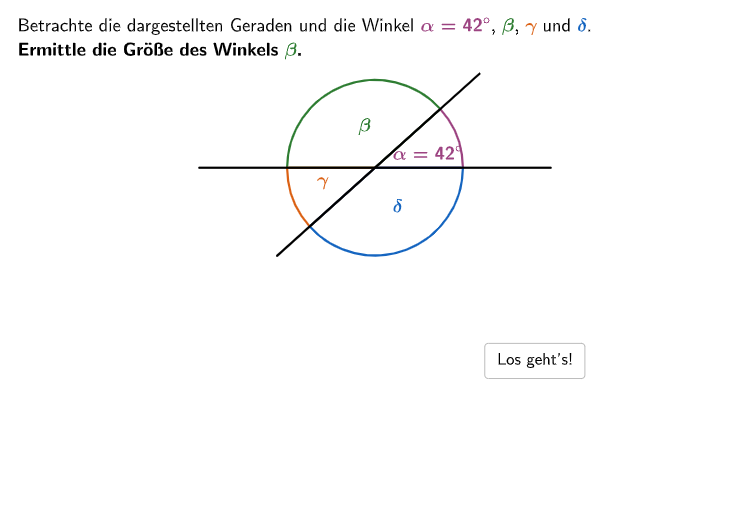
Besondere Winkelpaare
This example demonstrates how to calculate angles in geometric figures using supplementary and adjacent angles. Key mathematical concepts include angle classification (acute, right, obtuse, straight, reflex, and full angles) and angle measurement. Construction involves using GeoGebra commands like Angle, Point, and Segment to measure and calculate angles. Suitable for elementary students (grades 5-6) for geometry learning and angle measurement practice.
GeoGebra Commands & Parameters
Sequence(Random[1, 10], i, 1, 10) → randomNumbers, {3, 2, 9, 10, 7, 2, 4, 7, 9, 6}Element(randomNumbers, Mod[questionCount, Length[randomNumbers]] + 1) → randomNumberTextfield(input) → inputBoxAngle(Pos2, Pos1, Pos3) → alpha1Angle(Pos3, Pos1, Pos4) → beta1Angle(Pos4, Pos1, Pos5) → gamma1Angle(Pos5, Pos1, Pos2) → delta1Textfield(input21) → InputBox21Textfield(input22) → InputBox22SelectedIndex(dropdown31) → index31SelectedIndex(dropdown41) → index41SelectedIndex(dropdown51) → index51If(selecteda, index51 ≟ 4, index51 ≟ 3) → correctdd51TextToUnicode(Text[InputBox21]) → uni21TextToUnicode(Text[InputBox22]) → uni22Text(capa, Pos1 + (radius / 2 - 0.8, 0.4), false, true, 0, 0) → cap1Text(capb, Pos4 + (radius / 2 + 1.75, 1), false, true, 0, 0) → cap2Textfield(input31) → InputBox31TextToUnicode(Text[InputBox31]) → uni31Text(capc, Pos4 + (radius / 2 + 0.8, -0.3), false, true, 0, 0) → cap3Textfield(input41) → InputBox41TextToUnicode(Text[InputBox41]) → uni41Text(capd, Pos1 + (0.5, -0.8), false, true, 0, 0) → cap4Angle(Pos2, Pos1, Pos3) → alpha2Angle(Pos3, Pos1, Pos4) → beta2Angle(Pos4, Pos1, Pos5) → gamma2Angle(Pos5, Pos1, Pos2) → delta2Sequence(Pos61 + (2.25 * (cos((1° * k)), sin((1° * k)))), k, 0, 359) → PosList61Point(PosList61) → Pos62Sequence(Pos61 + (2.5 * (cos((1° * k)), sin((1° * k)))), k, 0, 359) → PosList62Point(PosList62) → Pos63If(IndexOf[Pos62, PosList61] ≟ 1, 360, IndexOf[Pos62, PosList61] - 1) → index621If(IndexOf[Pos61 - (Pos62 - Pos61), PosList61] ≟ 1, 360, IndexOf[Pos61 - (Pos62 - Pos61), PosList61] - 1) → index622If(IndexOf[Pos63, PosList62] ≟ 1, 360, IndexOf[Pos63, PosList62] - 1) → index631If(IndexOf[Pos61 - (Pos63 - Pos61), PosList62] ≟ 1, 360, IndexOf[Pos61 - (Pos63 - Pos61), PosList62] - 1) → index632Sort({index621, index622, index631, index632}) → IndexListAngle(Pos61 + (radius * UnitVector[Vector[Pos61, AnglePointList(3)]]), Pos61, Pos61 + (radius * UnitVector[Vector[Pos61, AnglePointList(4)]])) → delta3Angle(Pos61 + (radius * UnitVector[Vector[Pos61, AnglePointList(4)]]), Pos61, Pos61 + (radius * UnitVector[Vector[Pos61, AnglePointList(1)]])) → alpha3Angle(Pos61 + (radius * UnitVector[Vector[Pos61, AnglePointList(1)]]), Pos61, Pos61 + (radius * UnitVector[Vector[Pos61, AnglePointList(2)]])) → beta3Angle(Pos61 + (radius * UnitVector[Vector[Pos61, AnglePointList(2)]]), Pos61, Pos61 + (radius * UnitVector[Vector[Pos61, AnglePointList(3)]])) → gamma3SelectedIndex(dropdown61) → index61Textfield(input61) → InputBox61If(step ≟ 2, (11.5, 2.6), step ≟ 3, (11.75, 1.5), step ≟ 4, (0, 1.25), step ≟ 6, (-0.5, -0.35), (1, 1)) → PosBtnShowSolutionSegment(Pos1 + (Distance[Pos1, Pos62] * (cos(Angle[Pos1 + (1, 0), Pos1, Pos62] + arrowCircleDistance + arrowCircleAngle), sin(Angle[Pos1 + (1, 0), Pos1, Pos62] + arrowCircleDistance + arrowCircleAngle))), Pos1 + (Distance[Pos1, Pos62] * (cos(Angle[Pos1 + (1, 0), Pos1, Pos62] + arrowCircleDistance + arrowCircleAngle), sin(Angle[Pos1 + (1, 0), Pos1, Pos62] + arrowCircleDistance + arrowCircleAngle))) + (arrowCircleLength * UnitOrthogonalVector[Vector[Pos1, Pos1 + (Distance[Pos1, Pos62] * (cos(Angle[Pos1 + (1, 0), Pos1, Pos62] + arrowCircleDistance + arrowCircleAngle), sin(Angle[Pos1 + (1, 0), Pos1, Pos62] + arrowCircleDistance + arrowCircleAngle)))]])) → arrowCircleArrow621Segment(Pos1 + (Distance[Pos1, Pos63] * (cos(Angle[Pos1 + (1, 0), Pos1, Pos63] + arrowCircleDistance + arrowCircleAngle), sin(Angle[Pos1 + (1, 0), Pos1, Pos63] + arrowCircleDistance + arrowCircleAngle))), Pos1 + (Distance[Pos1, Pos63] * (cos(Angle[Pos1 + (1, 0), Pos1, Pos63] + arrowCircleDistance + arrowCircleAngle), sin(Angle[Pos1 + (1, 0), Pos1, Pos63] + arrowCircleDistance + arrowCircleAngle))) + (arrowCircleLength * UnitOrthogonalVector[Vector[Pos1, Pos1 + (Distance[Pos1, Pos63] * (cos(Angle[Pos1 + (1, 0), Pos1, Pos63] + arrowCircleDistance + arrowCircleAngle), sin(Angle[Pos1 + (1, 0), Pos1, Pos63] + arrowCircleDistance + arrowCircleAngle)))]])) → arrowCircleArrow631Segment(Pos1 + (Distance[Pos1, Pos62] * (cos(Angle[Pos1 + (1, 0), Pos1, Pos62] - arrowCircleDistance - arrowCircleAngle), sin(Angle[Pos1 + (1, 0), Pos1, Pos62] - arrowCircleDistance - arrowCircleAngle))), Pos1 + (Distance[Pos1, Pos62] * (cos(Angle[Pos1 + (1, 0), Pos1, Pos62] - arrowCircleDistance - arrowCircleAngle), sin(Angle[Pos1 + (1, 0), Pos1, Pos62] - arrowCircleDistance - arrowCircleAngle))) - (arrowCircleLength * UnitOrthogonalVector[Vector[Pos1, Pos1 + (Distance[Pos1, Pos62] * (cos(Angle[Pos1 + (1, 0), Pos1, Pos62] - arrowCircleDistance - arrowCircleAngle), sin(Angle[Pos1 + (1, 0), Pos1, Pos62] - arrowCircleDistance - arrowCircleAngle)))]])) → arrowCircleArrow622Segment(Pos1 + (Distance[Pos1, Pos63] * (cos(Angle[Pos1 + (1, 0), Pos1, Pos63] - arrowCircleDistance - arrowCircleAngle), sin(Angle[Pos1 + (1, 0), Pos1, Pos63] - arrowCircleDistance - arrowCircleAngle))), Pos1 + (Distance[Pos1, Pos63] * (cos(Angle[Pos1 + (1, 0), Pos1, Pos63] - arrowCircleDistance - arrowCircleAngle), sin(Angle[Pos1 + (1, 0), Pos1, Pos63] - arrowCircleDistance - arrowCircleAngle))) - (arrowCircleLength * UnitOrthogonalVector[Vector[Pos1, Pos1 + (Distance[Pos1, Pos63] * (cos(Angle[Pos1 + (1, 0), Pos1, Pos63] - arrowCircleDistance - arrowCircleAngle), sin(Angle[Pos1 + (1, 0), Pos1, Pos63] - arrowCircleDistance - arrowCircleAngle)))]])) → arrowCircleArrow632If(step ≟ 2, correct21 ∧ correct22, step ≟ 3, correctdd31 ∧ correct31 ∧ isCalculated31, step ≟ 4, correctdd41 ∧ correct41 ∧ isCalculated41, step ≟ 5, correctdd51, true) → clickableBtnNext
AI Drawing Prompt Reference
Draw a geometric figure with four rays emanating from a common vertex, forming four adjacent angles. Mark each angle with an arc and provide input boxes and dropdown menus for entering or selecting angle measures. Display labels for angle types (acute, right, obtuse, etc.) and include arrows indicating rotation direction. The layout includes multiple interactive steps for calculating and verifying angle relationships.
The prompt above was compiled from the original drawing commands and is for reference only.