
Counter Examples of Congruent Triangles
Loading the math board and drawing, please wait…
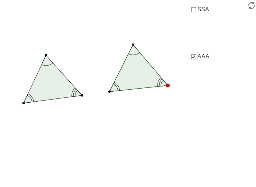
This applet helps students visualize the triangle congruence postulates (excluding those involving right triangles). It covers key mathematical concepts such as triangle congruence. Using GeoGebra commands like Segment, Angle, Circle, and Point, it dynamically demonstrates the construction of triangles. Suitable for middle school and above students learning geometry.
GeoGebra Commands & Parameters
Segment(C, A) → bAngle(A, C, B) → γ_cSegment(B, C) → a_cSegment(A, B) → c_cAngle(B, A, C) → α_cAngle(C, B, A) → β_cCircle(H, c_c) → k_{cSSA}Circle(H, a_c) → p_{aSSA}Point(p_{aSSA}) → IPoint(k_{cSSA}) → JCircle(I, b) → q_{bSSA}Segment(H, I) → lSegment(H, J) → mRotate(H, (-γ_c), I) → H'Angle(H', I, H) → δLine(H', I) → dPoint(d) → DPolygon(C, A, B) → poly1, b_{O}, c_{O}, a_{O}Polygon(H, J, D, I) → poly2_1, h, j, b_{SSAc}, iDynamicCoordinates(D, If[Distance[D, J] < 0.13, x(J), x(D)], If[Distance[D, J] < 0.13, y(J), y(D)]) → ESegment(E, I) → b_{SSA}Polygon(H, I, E) → poly3, e_1, h_1, i_1If(poly1 - 1.5 ≤ poly2_1 ≤ poly1 + 1.5 ∧ E ≟ J, true, false) → gCircle(H_1, c_c) → k_{cSSS}Circle(H_1, a_c) → p_{aSSS}Point(p_{aSSS}) → I_1Point(k_{cSSS}) → J_1Circle(I_1, b) → q_{bSSS}Segment(H_1, I_1) → l_1Segment(H_1, J_1) → m_1Point(q_{bSSS}) → K_1Segment(I_1, K_1) → n_1Segment(B, A) → cSegment(A, C) → b_cSegment(B, C) → aDynamicCoordinates(K_1, If[Distance[J_1, K_1] < 0.13, x(J_1), x(K_1)], If[Distance[K_1, J_1] < 0.13, y(J_1), y(K_1)]) → FPolygon(J_1, H_1, I_1) → poly4, i_2, j_2, h_2Point(p_{aSSS}) → GSegment(H_1, G) → eRotate(G, β_c, H_1) → G'Angle(G, H_1, G') → αLine(H_1, G') → fIntersect(k_{cSSA}, f, 2) → KSegment(G, L) → kSegment(H_1, K) → nDynamicCoordinates(L, If[Distance[K, L] < 0.13, x(K), x(L)], If[Distance[L, K] < 0.13, y(K), y(L)]) → MPolygon(H_1, G, M) → poly2, m_2, h_3, g_1Point(p_{aSSS}) → NRotate(N, β_c, H_1) → N'Angle(N, H_1, N') → βRotate(H_1, α_c, N') → OLine(H_1, N) → pSegment(H_1, N) → sLine(H_1, N') → qPoint(q) → PRotate(H_1, α_c, P) → QAngle(H_1, P, Q) → γLine(P, Q) → rSegment(H_1, P) → tPoint(r) → RSegment(P, R) → a_1DynamicCoordinates(R, If[Distance[N, R] < 0.13, x(N), x(R)], If[Distance[R, N] < 0.13, y(N), y(R)]) → SPolygon(S, H_1, P) → poly5, p_1, s_1, h_4Point(p_{aSSA}) → TRotate(T, β_c, H_1) → T'Angle(T, H_1, T') → εRotate(H_1, (-γ_c), T) → UAngle(U, T, H_1) → ζLine(H_1, T') → b_1Line(U, T) → c_1Segment(H_1, T) → d_1Point(c_1) → VPoint(b_1) → WDynamicCoordinates(W, If[Distance[V, W] < 0.13, x(V), x(W)], If[Distance[V, W] < 0.13, y(V), y(W)]) → ZSegment(Z, H_1) → f_1Segment(V, T) → k_1Polygon(H_1, V, T) → poly6, t_1, h_5, vRotate(A_1, β_c, H_1) → B_1Angle(A_1, H_1, B_1) → ηLine(H_1, B_1) → r_1Rotate(H_1, (-γ_c), A_1) → C_1Angle(C_1, A_1, H_1) → θLine(C_1, A_1) → a_2Intersect(r_1, a_2) → D_1Angle(H_1, D_1, A_1) → ιSegment(H_1, A_1) → q_1Segment(D_1, A_1) → b_2Segment(D_1, H_1) → c_2Polygon(A_1, H_1, D_1) → poly7, d_2, a_3, h_6If(a - 0.1 ≤ q_1 ≤ a + 0.1, true, false) → g_2Polygon(H_1, D_1, A_1) → poly8, a_4, h_7, d_3
AI Drawing Prompt Reference
Draw a triangle ABC, then construct different triangles using SSA, SAS, and SSS conditions to observe their relationships. First, draw triangle ABC, then use the SSA condition to construct a new triangle by rotating and moving points to adjust angles and lengths, ensuring the new triangle is not congruent to the original. Next, use the SAS condition to construct another triangle, adjusting angles and lengths to verify non-congruence. Finally, use the SSS condition to construct a triangle with all sides equal to those of the original, observing if they are congruent.
The prompt above was compiled from the original drawing commands and is for reference only.