
Cosine Function Construction
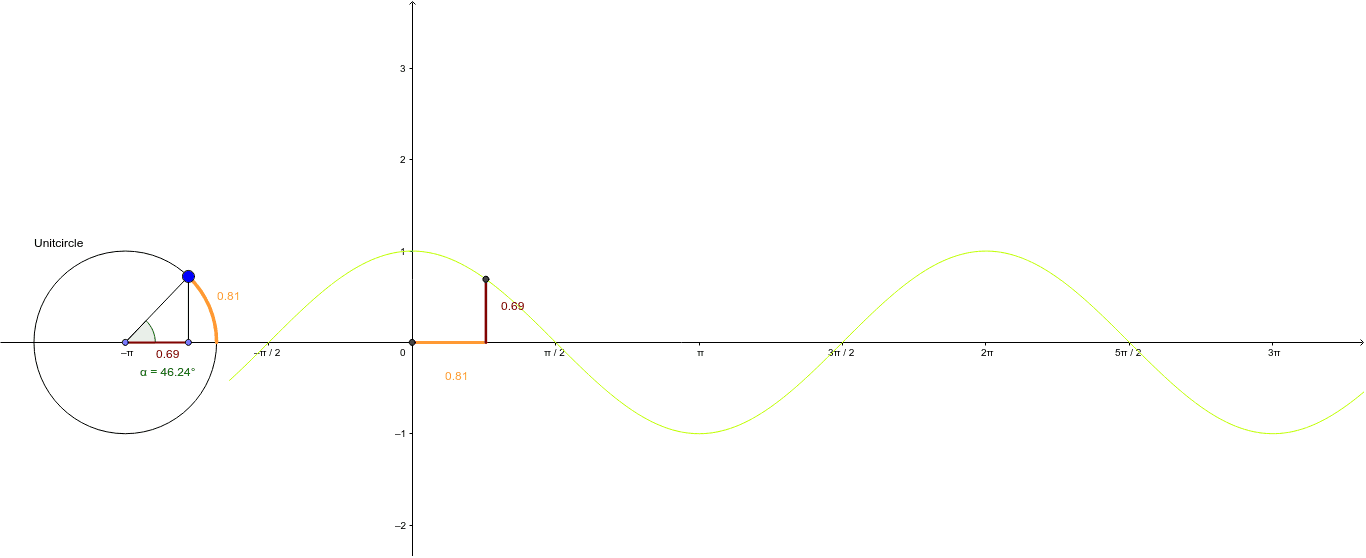
Loading the math board and drawing, please wait…
This example demonstrates the geometric meaning of the cosine function through dynamic visualization; core math concepts include the cosine theorem, unit circle, and trigonometric relationships; construction highlights the use of GeoGebra commands like Point, Circle, Intersect, CircleArc, Segment, Function, and Angle; suitable for high school mathematics teaching to intuitively understand the definition and properties of the cosine function.
GeoGebra Commands & Parameters
Point(xAxis) → ACircle(A, 1) → UnitcirclePoint(Unitcircle) → BIntersect(Unitcircle, xAxis, 2) → HCircleArc(A, H, B) → gIntersect(xAxis, yAxis) → CSegment(C, Point[Circle[C, g]]) → a_1Point(a_1) → EPoint(xAxis) → DSegment(C, E) → bSegment(A, B) → dSegment(F, B) → eSegment(B, F) → fSegment(E, G) → iSegment(A, F) → kFunction(h, -2, 15) → pAngle(H, A, B) → α
AI Drawing Prompt Reference
Draw a unit circle and x-axis, mark point B on the circle, connect A to B, intersect x-axis at H, draw arc AHB. Take point C on x-axis, connect C to midpoint E of arc AHB, and C to E. Highlight key points and segments, show cosine function graph and angle α, demonstrating cosine theorem and trigonometric relationships.
The prompt above was compiled from the original drawing commands and is for reference only.