
Converting Percentages to Decimals and Fractions
Loading the math board and drawing, please wait…
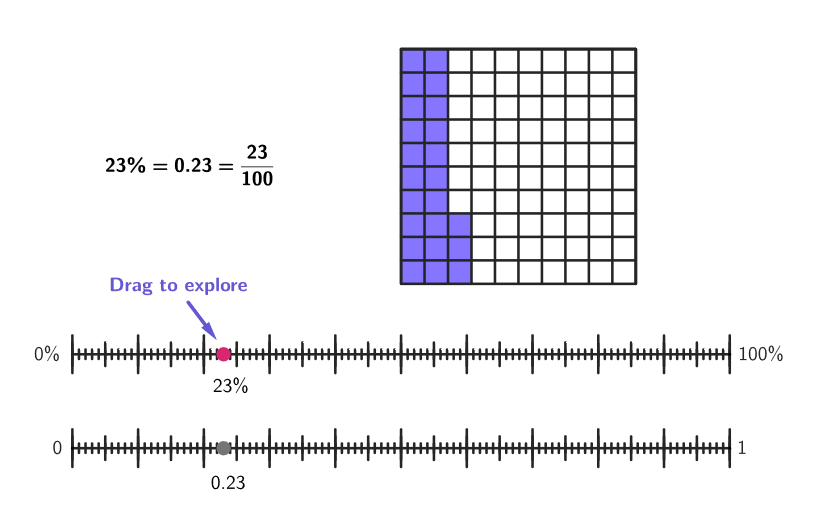
This example demonstrates the equivalence between percentages, decimals, and fractions using double number lines and visual models. Key mathematical concepts include percentage conversion, number line representation, and proportional relationships. Construction involves GeoGebra commands like Sequence, Point, and Polygon to create number line models. Suitable for elementary and middle school students to develop number sense and mathematical thinking.
GeoGebra Commands & Parameters
Sequence((k, y(E)), k, x(E), x(F), Distance[E, F] / 100) → ptGridPoint(ptGrid) → PPolygon(A, B, 4) → poli1Fill, j, m, n, p, M, NPolygon(A, B, 4) → poli1Border, f, g, h, i, C, DMirror(P1, yAxis) → P1'Mirror(P1', xAxis) → P1''Mirror(P1'', yAxis) → P1'''Polygon(P1, P1', P1'', P1''') → peep, p1, p1', p1'', p1'''Segment(E, F) → segmPercSequence(Segment[(t, y(E) - 0.8), (t, y(E) + 0.8)], t, x(E), x(F), Distance[E, F] / 10) → longTicks1Sequence(Segment[(t, y(E) - 0.5), (t, y(E) + 0.5)], t, x(E), x(F), Distance[E, F] / 20) → mediumTicks1Sequence(Segment[(t, y(E) - 0.2), (t, y(E) + 0.2)], t, x(E), x(F), Distance[E, F] / 100) → shortTicks1Sequence(E + (k / 100 * (F - E)), k, 0, 100) → segmGridZip({Segment[(k, 0), (k, 10)], Segment[(0, k), (10, k)]}, k, 1…10) → squareDivSegment(G, H) → segmNumVector(E, G) → uTranslate(longTicks1, u) → longTicks2Translate(mediumTicks1, u) → mediumTicks2Translate(shortTicks1, u) → shortTicks2If(x(P) ≠ x(F), Polygon[A, L, END, I, K, D], poli1Fill) → poli2Vector(O, R) → v
AI Drawing Prompt Reference
Draw two parallel number lines with different lengths and densities of tick marks to represent percentages, tenths, and hundredths, and use colored filled areas on the number lines to show the correspondence between percentages and fractions. Start by creating the basic grid and ticks, then use mirroring and translation to create symmetrical visual models, and finally combine the number lines with the filled areas to form an intuitive illustration of mathematical concepts.
The prompt above was compiled from the original drawing commands and is for reference only.