
Construction of Triangle Altitude
Loading the math board and drawing, please wait…
In collections
Randomised Questions
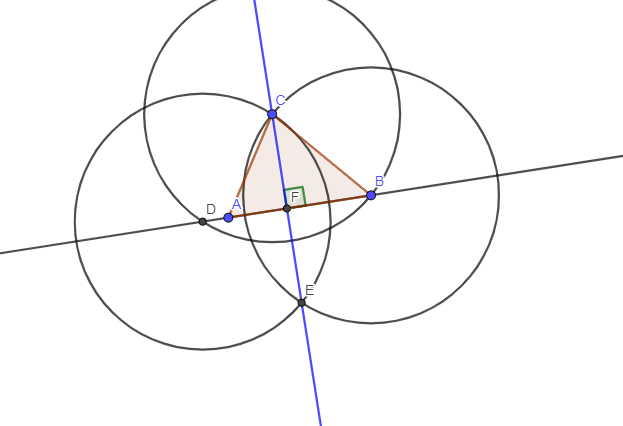
This example demonstrates how to construct the altitude of a triangle using GeoGebra. The key mathematical concepts include triangle geometry, angle measurement, and construction techniques. The construction involves GeoGebra commands such as Polygon, Line, Circle, Intersect, and Angle, along with objects like A, B, C, t1, c, a, b, f, d, D, e, g, E, h, F, and α. It is suitable for middle or high school mathematics education to help understand geometric construction principles and enhance spatial reasoning skills.
GeoGebra Commands & Parameters
Polygon(A, B, C) → t1, c, a, bLine(A, B) → fCircle(C, B) → dIntersect(d, f, 2) → DCircle(D, C) → eCircle(B, C) → gIntersect(e, g, 2) → ELine(C, E) → hIntersect(f, h) → FAngle(B, F, C) → α
AI Drawing Prompt Reference
Draw a triangle ABC and construct its altitude. First, connect points A and B to form line segment AB. Then, draw a circle with center C and radius BC, intersecting the extension of line segment AB at point D. Next, draw a circle with center D and radius DC, intersecting the circle with center B and radius BC at point E. Finally, connect points C and E, and let the intersection with the extension of line segment AB be point F, which is the altitude of triangle ABC.
The prompt above was compiled from the original drawing commands and is for reference only.