
Constructing Two Geometric Means
Loading the math board and drawing, please wait…
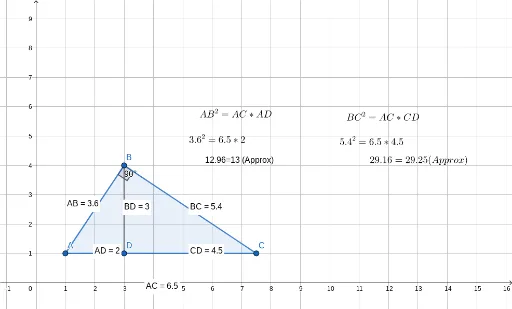
This example demonstrates the construction of two geometric means. Key mathematical concepts include geometric mean, similar triangles, and equations. Using GeoGebra commands such as Distance, Polygon, and Angle, the relevant geometric figures are constructed. Suitable for students at the junior high school level and above to learn about geometric means and their applications.
GeoGebra Commands & Parameters
Distance(B, C) → distanceBCDistance(A, B) → distanceABDistance(A, C) → distanceACPolygon(A, B, C) → t1, c, a, bAngle(A, B, C) → αPoint(b) → DSegment(B, D) → fDistance(B, D) → distanceBDMidpoint(B, D) →Distance(A, D) → distanceADMidpoint(A, D) →Distance(C, D) → distanceCDMidpoint(C, D) →
AI Drawing Prompt Reference
Draw a triangle ABC with points A, B, and C as vertices. First, calculate the lengths of AB, AC, and BC. Then, draw triangle ABC. Next, construct the angle bisector of angle ABC and find its intersection with side AC at point D. Draw line segment BD and calculate its length. Find the midpoints E and F of BD and AD, respectively, and calculate the lengths of DE and DF.
The prompt above was compiled from the original drawing commands and is for reference only.