
Constructing the Wallace-Simson Line
Loading the math board and drawing, please wait…
In collections
Learn Geometry
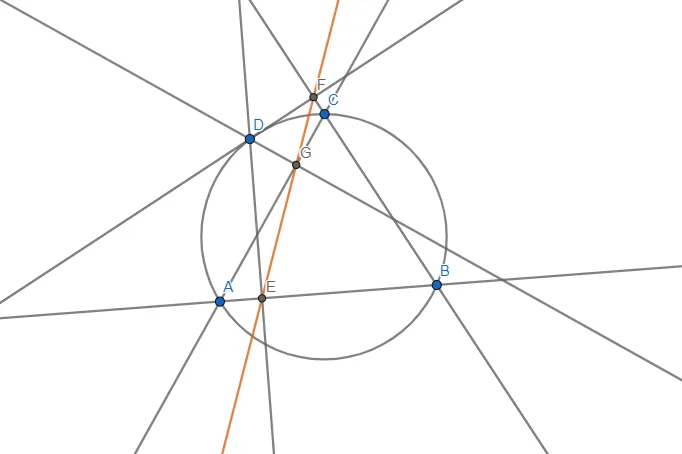
This example demonstrates how to construct the Wallace-Simson line using GeoGebra. The Wallace-Simson line is an important property of a triangle, involving triangles, circles, and geometric construction. By drawing a triangle, a circle, and points, and using GeoGebra commands such as Line, Circle, Point, OrthogonalLine, and Intersect, this example clearly illustrates this geometric phenomenon. Suitable for high school mathematics education and learning.
GeoGebra Commands & Parameters
Line(A, B) → fLine(B, C) → gLine(C, A) → hCircle(A, B, C) → cPoint(c) → DOrthogonalLine(D, h) → iOrthogonalLine(D, f) → jOrthogonalLine(D, g) → kIntersect(f, j) → EIntersect(g, k) → FIntersect(h, i) → GLine(E, G) → l
AI Drawing Prompt Reference
Draw a triangle and a circumcircle around its vertices. Pick a point on the circle and draw perpendicular lines from this point to each side of the triangle, obtaining three intersection points. Finally, connect these three points to form a line segment, illustrating the Wallace-Simson line.
The prompt above was compiled from the original drawing commands and is for reference only.