
Constructing Parallelograms by Melissa Patti
Loading the math board and drawing, please wait…
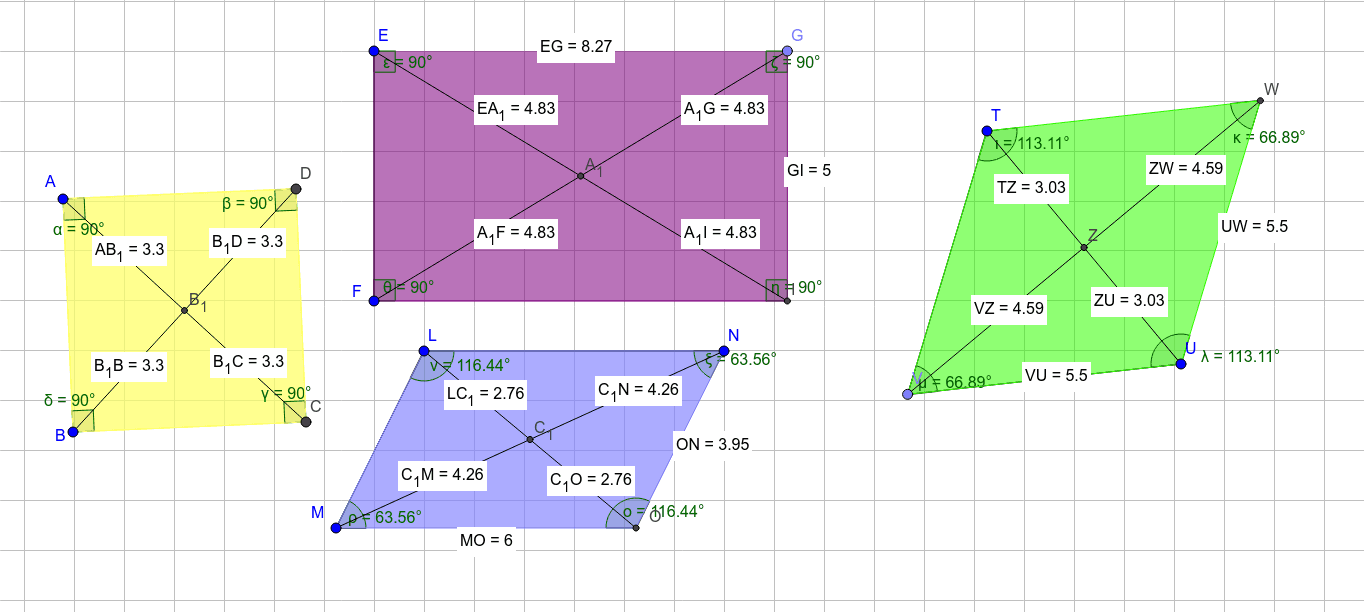
This example demonstrates how to construct parallelograms using GeoGebra. Key mathematical concepts include parallel lines, distance, and rotation. Using commands like Polygon, Segment, and Rotate, it dynamically illustrates the properties of parallelograms. Suitable for middle school and above students to learn geometric transformations and basic geometric construction.
GeoGebra Commands & Parameters
Polygon(A, B, 4) → poly1, a, b, c, d, C, DSegment(E, F) → eOrthogonalLine(E, e) → fOrthogonalLine(F, e) → gPoint(f) → GPoint(g) → HOrthogonalLine(G, f) → hOrthogonalLine(H, h) → iIntersect(g, h) → IPolygon(E, G, I, F) → poly2, e_1, g_1, i_1, f_1Segment(J, K) → jSegment(L, M) → kLine(N, k) → lLine(M, k) → mSegment(L, N) → nLine(M, n) → pIntersect(l, p) → OPolygon(M, L, N, O) → poly3, m_1, l_1, n_1, oSegment(J, P) → qSegment(K, Q) → rSegment(P, Q) → sPolygon(J, K, Q, P) → poly4, j_1, k_1, q_1, p_1Segment(R, S) → tRotate(R, 40*°, R) → R'Rotate(S, 40*°, R) → S'Segment(R', S') → t'Rotate(R', 140*°, S') → R''Rotate(S', 140*°, S') → S''Segment(R'', S'') → t''Segment(S, R'') → a_1Polygon(R, S, R'', S') → poly5, r_1, s_1, r'', s'Segment(T, U) → b_1LineBisector(b_1) → c_1Point(c_1) → VSegment(T, V) → d_1Line(U, d_1) → h_1Segment(V, U) → t_1Line(T, t_1) → a_2Intersect(c_1, h_1) → WPolygon(T, W, U, V) → poly6, t_2, w, u, vAngle(B, A, D) → αAngle(A, D, C) → βAngle(D, C, B) → γAngle(C, B, A) → δDistance(A, C) → distanceACSegment(A, C) → b_2Segment(D, B) → c_2Distance(D, B) → distanceDBAngle(F, E, G) → εAngle(E, G, I) → ζAngle(G, I, F) → ηAngle(I, F, E) → θSegment(E, I) → d_2Segment(G, F) → e_2Distance(E, I) → distanceEIDistance(G, F) → distanceGFAngle(V, T, W) → ιAngle(T, W, U) → κAngle(W, U, V) → λAngle(U, V, T) → μSegment(T, U) → f_2Segment(V, W) → g_2Distance(T, U) → distanceTUDistance(W, V) → distanceWVDistance(V, U) → distanceVUDistance(U, W) → distanceUWIntersect(f_2, g_2) → ZDistance(T, Z) → distanceTZDistance(Z, U) → distanceZUDistance(V, Z) → distanceVZDistance(Z, W) → distanceZWIntersect(d_2, e_2) → A_1Distance(E, A_1) → distanceEA1Distance(A_1, G) → distanceA1GDistance(A_1, I) → distanceA1IDistance(A_1, F) → distanceA1FIntersect(b_2, c_2) → B_1Distance(A, B_1) → distanceAB1Distance(B_1, C) → distanceB1CDistance(B_1, B) → distanceB1BDistance(B_1, D) → distanceB1DAngle(M, L, N) → νAngle(L, N, O) → ξAngle(N, O, M) → οAngle(O, M, L) → ρSegment(L, O) → h_2Segment(N, M) → i_2Intersect(h_2, i_2) → C_1Distance(L, C_1) → distanceLC1Distance(C_1, O) → distanceC1ODistance(C_1, M) → distanceC1MDistance(C_1, N) → distanceC1NDistance(M, O) → distanceMODistance(O, N) → distanceONDistance(E, G) → distanceEGDistance(G, I) → distanceGI
AI Drawing Prompt Reference
Construct a parallelogram with points A and B as the endpoints of a diagonal. Use rotation and parallel line construction to create the other sides. First, construct quadrilateral ABCD, then rotate points D and C to create new points D' and C', and connect these to form a new parallelogram. Next, use lines and rotation commands to create the other sides of the parallelogram using points A and B as the diagonal endpoints, and finally complete the figure with rotations and parallel line constructions.
The prompt above was compiled from the original drawing commands and is for reference only.