
Constructing Near 1000
Loading the math board and drawing, please wait…
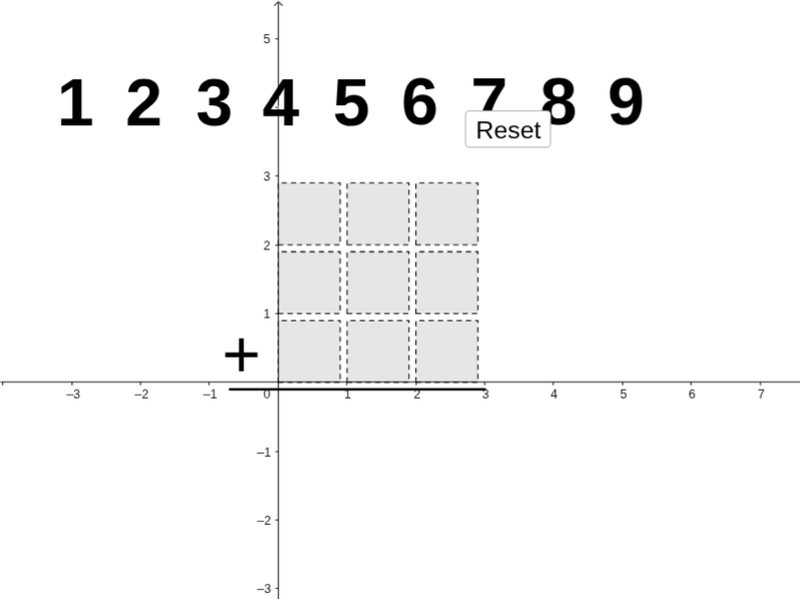
This example demonstrates the geometric construction and numerical calculation using polygons to achieve a sum close to 1000. It involves core math concepts like addition, logic operations, natural numbers, integers, dilation, histograms, and prism volumes. Key GeoGebra commands and objects used include Polygon, Segment, If, Mod, Div, and Sequence. Suitable for middle school and above students to learn geometric constructions, numerical computations, and spatial reasoning.
GeoGebra Commands & Parameters
Polygon((0, 0), (0.9, 0), 4) → poly1Polygon((2, 0), (2.9, 0), 4) → poly3Polygon((1, 0), (1.9, 0), 4) → poly2Polygon((0, 1), (0.9, 1), 4) → poly4Polygon((1, 1), (1.9, 1), 4) → poly5Polygon((2, 1), (2.9, 1), 4) → poly6Polygon((0, 2), (0.9, 2), 4) → poly7Polygon((1, 2), (1.9, 2), 4) → poly8Polygon((2, 2), (2.9, 2), 4) → poly9Segment(J, K) → aIf(IsInRegion[A, poly9], 1, If[IsInRegion[B, poly9], 2, If[IsInRegion[C, poly9], 3, If[IsInRegion[D, poly9], 4, If[IsInRegion[E, poly9], 5, If[IsInRegion[F, poly9], 6, If[IsInRegion[G, poly9], 7, If[IsInRegion[H, poly9], 8, If[IsInRegion[I, poly9], 9, 0]]]]]]]]) → nineSumIf(IsInRegion[A, poly8], 1, If[IsInRegion[B, poly8], 2, If[IsInRegion[C, poly8], 3, If[IsInRegion[D, poly8], 4, If[IsInRegion[E, poly8], 5, If[IsInRegion[F, poly8], 6, If[IsInRegion[G, poly8], 7, If[IsInRegion[H, poly8], 8, If[IsInRegion[I, poly8], 9, 0]]]]]]]]) → eightSumIf(IsInRegion[A, poly7], 1, If[IsInRegion[B, poly7], 2, If[IsInRegion[C, poly7], 3, If[IsInRegion[D, poly7], 4, If[IsInRegion[E, poly7], 5, If[IsInRegion[F, poly7], 6, If[IsInRegion[G, poly7], 7, If[IsInRegion[H, poly7], 8, If[IsInRegion[I, poly7], 9, 0]]]]]]]]) → sevenSumIf(IsInRegion[A, poly6], 1, If[IsInRegion[B, poly6], 2, If[IsInRegion[C, poly6], 3, If[IsInRegion[D, poly6], 4, If[IsInRegion[E, poly6], 5, If[IsInRegion[F, poly6], 6, If[IsInRegion[G, poly6], 7, If[IsInRegion[H, poly6], 8, If[IsInRegion[I, poly6], 9, 0]]]]]]]]) → sixSumIf(IsInRegion[A, poly5], 1, If[IsInRegion[B, poly5], 2, If[IsInRegion[C, poly5], 3, If[IsInRegion[D, poly5], 4, If[IsInRegion[E, poly5], 5, If[IsInRegion[F, poly5], 6, If[IsInRegion[G, poly5], 7, If[IsInRegion[H, poly5], 8, If[IsInRegion[I, poly5], 9, 0]]]]]]]]) → fiveSumIf(IsInRegion[A, poly4], 1, If[IsInRegion[B, poly4], 2, If[IsInRegion[C, poly4], 3, If[IsInRegion[D, poly4], 4, If[IsInRegion[E, poly4], 5, If[IsInRegion[F, poly4], 6, If[IsInRegion[G, poly4], 7, If[IsInRegion[H, poly4], 8, If[IsInRegion[I, poly4], 9, 0]]]]]]]]) → fourSumIf(IsInRegion[A, poly3], 1, If[IsInRegion[B, poly3], 2, If[IsInRegion[C, poly3], 3, If[IsInRegion[D, poly3], 4, If[IsInRegion[E, poly3], 5, If[IsInRegion[F, poly3], 6, If[IsInRegion[G, poly3], 7, If[IsInRegion[H, poly3], 8, If[IsInRegion[I, poly3], 9, 0]]]]]]]]) → threeSumIf(IsInRegion[A, poly2], 1, If[IsInRegion[B, poly2], 2, If[IsInRegion[C, poly2], 3, If[IsInRegion[D, poly2], 4, If[IsInRegion[E, poly2], 5, If[IsInRegion[F, poly2], 6, If[IsInRegion[G, poly2], 7, If[IsInRegion[H, poly2], 8, If[IsInRegion[I, poly2], 9, 0]]]]]]]]) → twoSumIf(IsInRegion[A, poly1], 1, If[IsInRegion[B, poly1], 2, If[IsInRegion[C, poly1], 3, If[IsInRegion[D, poly1], 4, If[IsInRegion[E, poly1], 5, If[IsInRegion[F, poly1], 6, If[IsInRegion[G, poly1], 7, If[IsInRegion[H, poly1], 8, If[IsInRegion[I, poly1], 9, 0]]]]]]]]) → oneSumMod(onesPlace, 10) → SAoneMod(tensPlace + Div[onesPlace, 10], 10) → SAtenMod(Div[tensPlace + Div[onesPlace, 10], 10] + hundredsplace, 10) → SAhundDiv(Div[tensPlace + Div[onesPlace, 10], 10] + hundredsplace, 10) → SAthouSequence(Point[{i, 4}], i, -3, 5) → anchorsDiv(onesPlace, 10) → SAtensCarryDiv(tensPlace + Div[onesPlace, 10], 10) → SAhundredsCarrySegment(J - (1, 2.9), K - (0, 2.9)) → d
AI Drawing Prompt Reference
Draw a geometric pattern composed of multiple squares with increasing side lengths, arranged in three rows from left to right. Label numbers 1 to 9 within each square, using different colors or fills. Connect specific points based on the numbers inside the squares to form lines, creating a complex geometric design that illustrates the relationship between numbers and shapes.
The prompt above was compiled from the original drawing commands and is for reference only.