
Constructing Line Segments
Loading the math board and drawing, please wait…
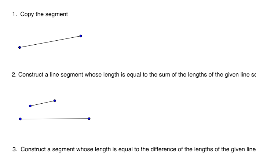
This example demonstrates how to construct line segments using GeoGebra commands. Core mathematical concepts include the basic definition of line segments and construction methods. Key construction points involve using the Segment command to create line segments, and applying objects such as A, B, a, text1, text2, C, D, b, E, F, c, text3, G, H, d, I, J, e, text4, K, L, f. Suitable for middle school and above students for learning and practicing geometric construction skills.
GeoGebra Commands & Parameters
Segment(A, B) → aSegment(C, D) → bSegment(E, F) → cSegment(G, H) → dSegment(I, J) → eSegment(K, L) → f
AI Drawing Prompt Reference
Create a geometric diagram showing six separate line segments, each defined by two endpoints. Arrange them scattered across the canvas without intersections. Use distinct colors or styles for each segment and label them with lengths or names. The overall layout should be clear, illustrating basic line segment construction for educational purposes.
The prompt above was compiled from the original drawing commands and is for reference only.