
Constructing a Rhombus with Circles, Segments, and Intersections
Loading the math board and drawing, please wait…
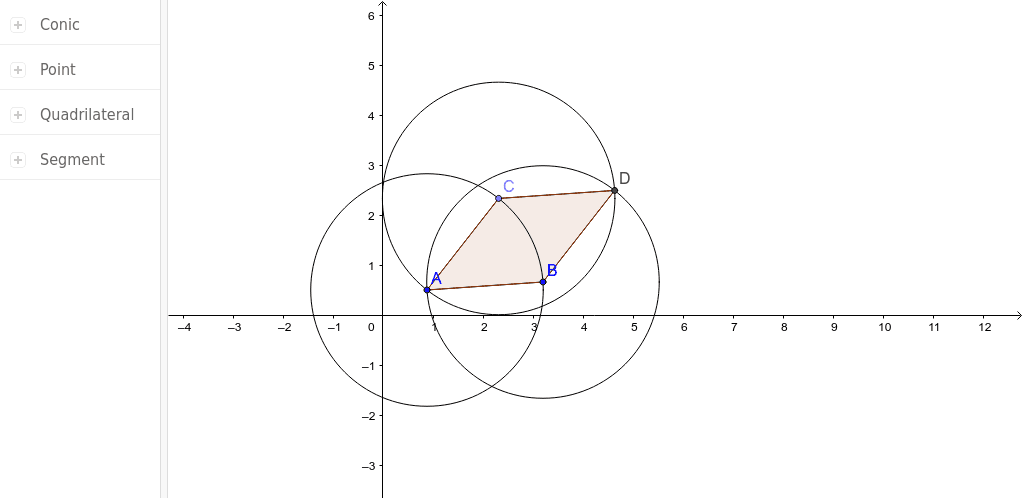
This GeoGebra example demonstrates how to construct a rhombus dynamically by using equal-length sides and intersection points. It highlights the defining property of a rhombus—four congruent sides—and related ideas such as circles as loci of points at a fixed distance, segment construction, circle–segment or circle–circle intersections, and polygon closure. The construction uses Point to create vertices A and B, Circle to draw equal-radius circles, Segment to connect sides, Intersect to locate C and D, and Polygon to form poly1, with auxiliary labels such as a, b, c, and d. It is suitable for middle-school geometry, high-school coordinate geometry, or classroom demonstrations of compass-and-straightedge reasoning and dynamic verification.
GeoGebra Commands & Parameters
Circle(A, B) → cPoint(c) → CSegment(A, B) → aSegment(A, C) → bCircle(C, A) → dCircle(B, A) → eIntersect(d, e, 2) → DSegment(C, D) → fSegment(B, D) → gPolygon(A, C, D, B) → poly1, a_1, c_1, d_1, b_1
AI Drawing Prompt Reference
Draw a rhombus with four equal sides. Start with points A and B, connect them to form a line segment. Draw two circles with centers at A and B and the same radius. Find the intersection points of these circles as points C and D. Connect C to D and B to D, then form the rhombus using these points.
The prompt above was compiled from the original drawing commands and is for reference only.