
Constructing a Regular Pyramid and Its Net
Loading the math board and drawing, please wait…
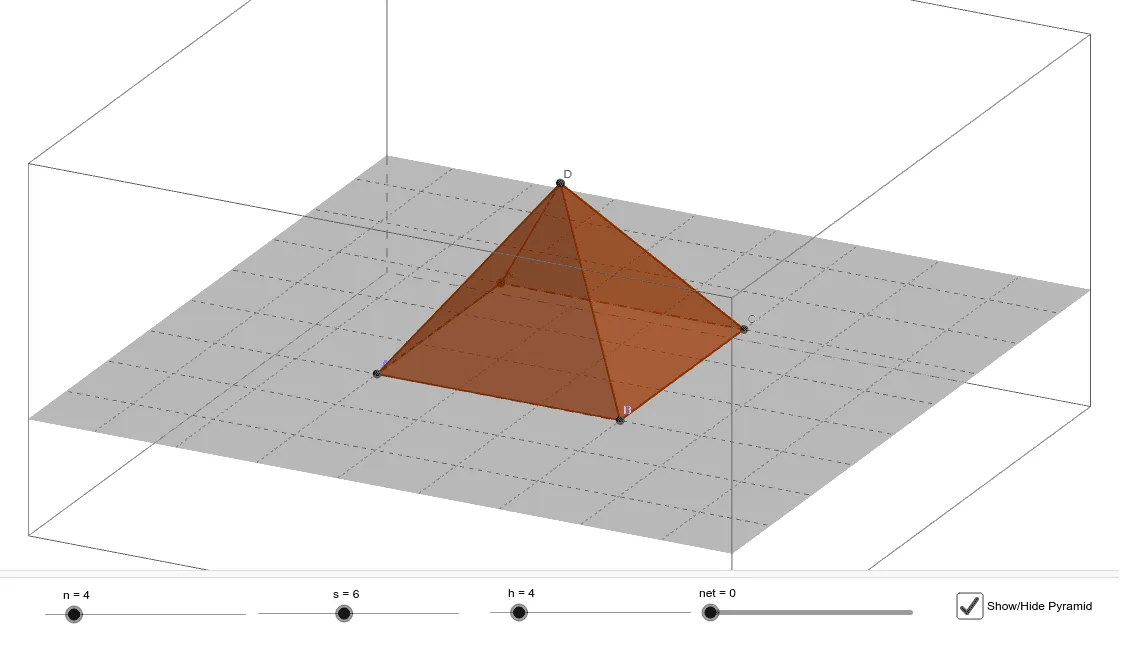
This GeoGebra example demonstrates how to construct a regular pyramid and display both its 3D solid and its net (unfolded surface). The core mathematical concepts include solid geometry, properties of regular pyramids (regular polygonal base, apex directly above the center), and the relationships among faces, edges, and vertices. Construction highlights: sliders control the number of base sides n, base side length s, and height h; commands such as Point, Segment, Polygon, Pyramid, and Net are used. Key objects include base vertices A, B, C, D, base polygon poly1, lateral faces faceABD, faceBCD, faceACD, and edges edgeAD, edgeBD, edgeCD. This is ideal for middle or high school geometry classes to explore pyramid structure, surface area, and the connection between 3D shapes and their 2D nets.
GeoGebra Commands & Parameters
Point(Circle[A, s]) → BSegment(A, B) → fPolygon(A, B, n) → poly1, g, t, C, K, N, Q, T, W, B_1, E_1, i, j, k, l, m, p, q, rPyramid(poly1, h) → a, D, face11, face13, edgeAD, edgeBD, edgeCD, edge1, edge5, edge9, edge13, edge17, faceABD, edge21, edge25, faceBCD, faceACD, face1, face3, face5, face7, face9Net(a, net) → c, E, F_1, H, I, J, M, P, S, V, A_1, D_1, F, G_1, faceEFG, faceEFH, faceFGI, faceEGJ, face2, face4, face6, face8, face10, G, face12, face14, edgeEF, edgeFG, edgeEG, edge2, edge6, edge10, edge14, edge18, L, edge22, edge26, edgeEH, edgeFH, edgeFI, edgeGI, edgeGJ, edgeEJ, edge3, edge4, O, edge7, edge8, edge11, edge12, edge15, edge16, edge19, edge20, edge23, edge24, R, edge27, edge28, U, Z, C_1
AI Drawing Prompt Reference
Draw a regular pyramid and its net. Start with a horizontal circle of given radius, place one vertex on it, and construct a regular polygonal base with a specified number of sides. Then set an apex directly above the center at a given height, connect it to each base vertex to form lateral edges and triangular faces, creating the 3D solid. Finally, unfold all faces along the edges onto a single plane to show the net, displaying the base polygon and all side triangles arranged flat.
The prompt above was compiled from the original drawing commands and is for reference only.