
Construct a Triangle from Angle Bisectors
Loading the math board and drawing, please wait…
In collections
Functions on the Domain of Space - Polygons
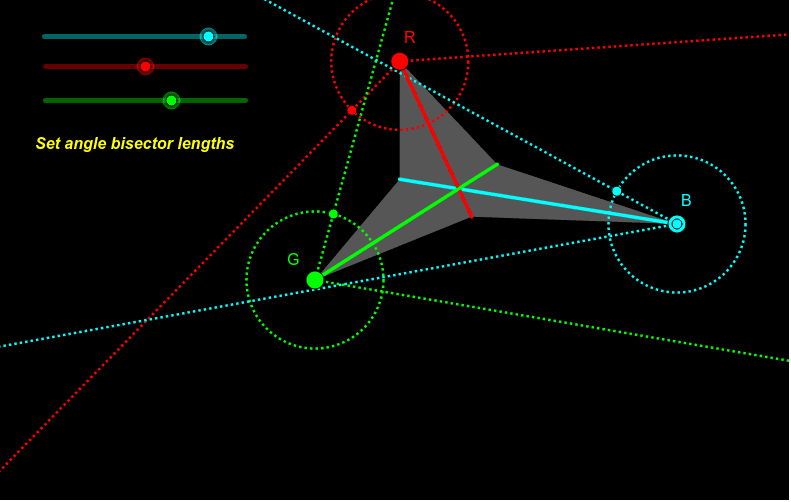
This example demonstrates how to construct a triangle using angle bisectors. Key math concepts include angle bisectors, geometric construction, and symmetry. Construction involves commands like Ray, Circle, Point, Mirror, Intersect, Segment, and Polygon in GeoGebra. Suitable for high school mathematics education or exploration by geometry enthusiasts.
GeoGebra Commands & Parameters
Ray(B, A) → aRay(G, A) → bRay(R, A) → cCircle(B, 1) → dCircle(R, 1) → eCircle(G, 1) → fPoint(e) → EPoint(d) → FPoint(f) → G_1Ray(R, E) → gMirror(E, c) → E'Ray(R, E') → hRay(G, G_1) → iMirror(G_1, b) → G'Ray(G, G') → jRay(B, F) → kMirror(B, a) → B'Mirror(F, a) → F'Ray(B', F') → k'Circle(B, Bbis) → pIntersect(p, a) → H,Segment(B, H) → lCircle(R, Cbis) → qIntersect(q, c) → I,Segment(R, I) → mCircle(G, Dbis) → rIntersect(r, b) → J,Segment(G, J) → nPolygon(B, J, R, H, G, I) → poly1, b_1, j_1, c_1, h_1, d_1, i_1
AI Drawing Prompt Reference
Draw a triangle by constructing its angle bisectors first. Use the intersections of the bisectors to find points, then draw rays from these points and reflect them across the bisectors to locate the triangle's vertices, finally connecting them to form the triangle.
The prompt above was compiled from the original drawing commands and is for reference only.