
Connecting Right Triangles to the Unit Circle via Trig Ratios
Loading the math board and drawing, please wait…
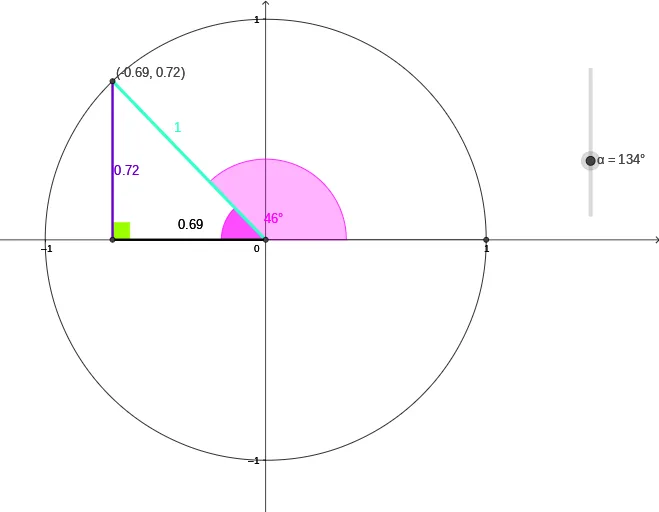
This example visually connects a right triangle’s acute angle to corresponding points on the unit circle, illustrating how sine, cosine, and tangent arise from the same geometric configuration. It focuses on the key ideas of trigonometric ratios in a right triangle, the unit circle interpretation of angles using coordinates, and how tangent and orthogonality conditions enforce consistent relationships. Construction uses Intersect to locate circle-line intersection points, Circle to build the unit circle, Rotate to reposition the triangle around the center, and Segment to draw the triangle’s sides. OrthogonalLine creates the right angle constraint, Angle labels the main angles, and Tangent adds the tangent line to highlight the tangent-related ratio. The dynamic set of points and labeled objects (e.g., A, B, C and text annotations) supports a clear, geometry-driven explanation. Suitable for secondary-level to early undergraduate trig instruction and for interactive classroom demonstrations.
GeoGebra Commands & Parameters
Intersect(xAxis, yAxis) → ACircle(A, 1) → cIntersect(c, xAxis, 2) → BRotate(B, α) → B'OrthogonalLine(B', xAxis) → fIntersect(f, xAxis) → CSegment(A, B') → gSegment(B', C) → hSegment(A, C) → iAngle(B', A, C) → βAngle(A, C, B') → γTangent(B', c) → j,Intersect(j, xAxis) → DSegment(B', D) → kIntersect(c, xAxis, 2) → ESegment(A, E) → mAngle(E, A, B') → δ
AI Drawing Prompt Reference
Draw a coordinate plane with the unit circle centered at the origin, then construct a right triangle linked to an acute angle on the circle. First place the reference point at the intersection of the axes and draw the circle of radius 1. Find the right-side intersection of the circle with the horizontal axis to get a point, then rotate that point about the origin by an angle to create a new position. Through the rotated point, draw a line perpendicular to the horizontal axis and mark where it meets the horizontal axis, forming a right triangle by connecting the origin reference point to the rotated point and to that intersection, and also connecting the rotated point to the intersection. Label the main angles of the triangle. At the rotated point, draw the tangent line to the unit circle and mark its intersection with the horizontal axis; connect this intersection to the rotated point, and add an additional angle label involving the origin and the rotated point via the relevant constructed intersection.
The prompt above was compiled from the original drawing commands and is for reference only.