
Conic Sections by Jonathan Holland
Loading the math board and drawing, please wait…
In collections
Conic sections
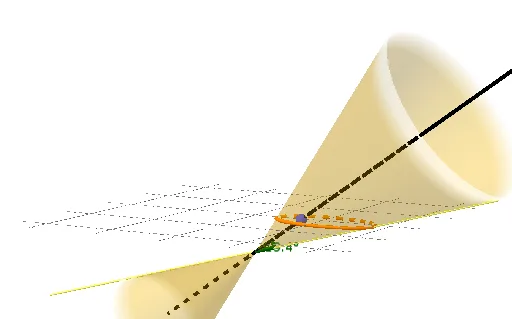
This example demonstrates the generation process of conic sections, which are geometric shapes obtained by intersecting a plane with a cone, including ellipses, parabolas, and hyperbolas. Using GeoGebra commands such as Point, Line, Vector, and IntersectPath, the example shows how to generate different conic sections by adjusting parameters. Suitable for high school mathematics education and learning.
GeoGebra Commands & Parameters
Point(zAxis) → ALine(A, B) → fVector(A, A + (10 * (B - A))) → uInfiniteCone(A, u, (π * α / 180)) → aIntersectPath(d, a) → cPointIn(a) → CLine(A, C) → gAngle(g, f) → βFocus(c) → D, EOrthogonalLine(D, d) → hOrthogonalLine(E, d) → iIntersect(i, f) → FIntersect(h, f) → GSphere(G, D) → bSphere(F, E) → e
AI Drawing Prompt Reference
Draw conic sections including ellipses, parabolas, and hyperbolas. Start by creating a line f, then generate a direction vector u through point A and line f, and use point A and vector u to create a cone a. Find the intersection curve c of line d and cone a, and take a point C on cone a. Create a line g through point A and C, and calculate the angle β between line g and line f. Find the foci D and E of curve c, create two lines h and i perpendicular to curve c through points D and E, and find the intersection points F and G of lines h and i with line f. Finally, create a sphere b with center G and radius D, and a sphere e with center F and radius E.
The prompt above was compiled from the original drawing commands and is for reference only.