
Congruent Triangles Exercise by powere
Loading the math board and drawing, please wait…
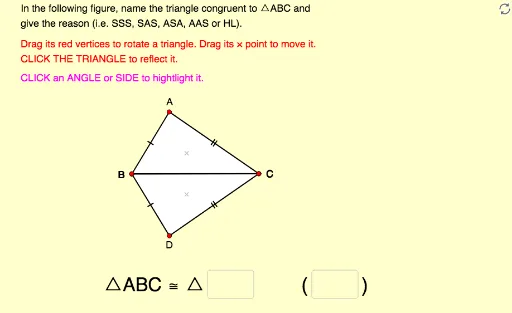
This example demonstrates identifying and naming congruent triangles with reasons by manipulating, rotating, and reflecting them. Key math concepts include congruence criteria, triangle properties, and angle relationships. It uses GeoGebra commands like Polygon, Vector, Angle, Intersect, Textfield, Segment, Midpoint, and Rotate. Suitable for high school students and teachers for geometry instruction and concept understanding.
GeoGebra Commands & Parameters
Polygon(A, B, C) → poly1, c, a, bVector(P, A) → uVector(P, B) → vVector(P, C) → wPolygon(A_1, B_1, C_1) → poly1_1, c_1, a_1, b_1Vector(P_1, A_1) → u_1Vector(P_1, B_1) → v_1Vector(P_1, C_1) → w_1Angle(B, A, C) → αAngle(A, C, B) → βAngle(A_1, C_1, B_1) → γAngle(B_1, A_1, C_1) → δIntersect(Circle[X_0, Side_b], Circle[Y_0, Side_a]) → Z_0, L, ,Polygon(X_0, Y_0, Z_0) → poly2, z_0, x_0, y_0Textfield(text13) → Ans1Textfield(text14) → Ans2Segment(D, E) → rMidpoint(Segment[Intersect[Circle[A, r], b], Intersect[Circle[A, r], c]]) → FMidpoint(Segment[Intersect[Circle[C, r], a], Intersect[Circle[C, r], b]]) → GMidpoint(Segment[Intersect[Circle[A_1, r], b_1], Intersect[Circle[A_1, r], c_1]]) → HMidpoint(Segment[Intersect[Circle[C_1, r], a_1], Intersect[Circle[C_1, r], b_1]]) → IAngle(A_1, B_1, C_1) → εAngle(C, B, A) → ζMidpoint(Segment[Intersect[Circle[B, r], a], Intersect[Circle[B, r], c]]) → JMidpoint(Segment[Intersect[Circle[B_1, r], a_1], Intersect[Circle[B_1, r], c_1]]) → KRotate(Translate[Mirror[X_0, x = 0], translate], (-(180° - Angle[Y_0, X_0, Z_0])), (11, 0)) → X_1Rotate(Translate[Mirror[Y_0, x = 0], translate], (-(180° - Angle[Y_0, X_0, Z_0])), (11, 0)) → Y_1Rotate(Translate[Mirror[Z_0, x = 0], translate], (-(180° - Angle[Y_0, X_0, Z_0])), (11, 0)) → Z_1