
Congruent Triangles by Mrs. Dunn
Loading the math board and drawing, please wait…
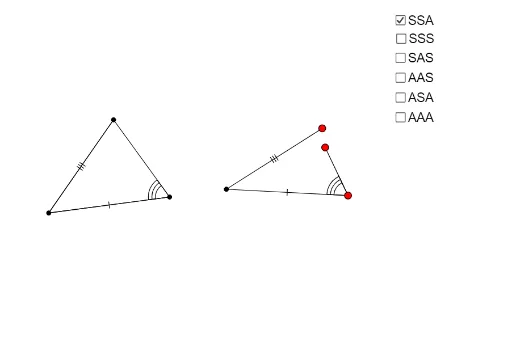
This example demonstrates the properties of congruent isosceles triangles and their construction. Key mathematical concepts include triangle congruence (SSS, SSA), properties of isosceles triangles, and dynamic geometric construction. The construction involves GeoGebra commands like Segment, Angle, Rotate, and Polygon, with DynamicCoordinates for parameterization. Suitable for middle school students learning congruence concepts or for geometric teaching demonstrations.
GeoGebra Commands & Parameters
Segment(C, A) → bAngle(A, C, B) → γ_cSegment(B, C) → a_cSegment(A, B) → c_cAngle(B, A, C) → α_cAngle(C, B, A) → β_cCircle(H, c_c) → k_{cSSA}Circle(H, a_c) → p_{aSSA}Point(p_{aSSA}) → IPoint(k_{cSSA}) → JCircle(I, b) → q_{bSSA}Segment(H, I) → lSegment(H, J) → mRotate(H, (-γ_c), I) → H'Angle(H', I, H) → δLine(H', I) → dPoint(d) → DPolygon(C, A, B) → poly1, b_{O}, c_{O}, a_{O}Polygon(H, J, D, I) → poly2_1, h, j, b_{SSAc}, iDynamicCoordinates(D, If[Distance[D, J] < 0.13, x(J), x(D)], If[Distance[D, J] < 0.13, y(J), y(D)]) → ESegment(E, I) → b_{SSA}Polygon(H, I, E) → poly3, e_1, h_1, i_1If(poly1 - 1.5 ≤ poly2_1 ≤ poly1 + 1.5 ∧ E ≟ J, true, false) → gCircle(H_1, c_c) → k_{cSSS}Circle(H_1, a_c) → p_{aSSS}Point(p_{aSSS}) → I_1Point(k_{cSSS}) → J_1Circle(I_1, b) → q_{bSSS}Segment(H_1, I_1) → l_1Segment(H_1, J_1) → m_1Point(q_{bSSS}) → K_1Segment(I_1, K_1) → n_1Segment(B, A) → cSegment(A, C) → b_cSegment(B, C) → aDynamicCoordinates(K_1, If[Distance[J_1, K_1] < 0.13, x(J_1), x(K_1)], If[Distance[K_1, J_1] < 0.13, y(J_1), y(K_1)]) → FPolygon(J_1, H_1, I_1) → poly4, i_2, j_2, h_2Point(p_{aSSS}) → GSegment(H_1, G) → eRotate(G, β_c, H_1) → G'Angle(G, H_1, G') → αLine(H_1, G') → fIntersect(k_{cSSA}, f, 2) → KSegment(G, L) → kSegment(H_1, K) → nDynamicCoordinates(L, If[Distance[K, L] < 0.13, x(K), x(L)], If[Distance[L, K] < 0.13, y(K), y(L)]) → MPolygon(H_1, G, M) → poly2, m_2, h_3, g_1Point(p_{aSSS}) → NRotate(N, β_c, H_1) → N'Angle(N, H_1, N') → βRotate(H_1, α_c, N') → OLine(H_1, N) → pSegment(H_1, N) → sLine(H_1, N') → qPoint(q) → PRotate(H_1, α_c, P) → QAngle(H_1, P, Q) → γLine(P, Q) → rSegment(H_1, P) → tPoint(r) → RSegment(P, R) → a_1DynamicCoordinates(R, If[Distance[N, R] < 0.13, x(N), x(R)], If[Distance[R, N] < 0.13, y(N), y(R)]) → SPolygon(S, H_1, P) → poly5, p_1, s_1, h_4Point(p_{aSSA}) → TRotate(T, β_c, H_1) → T'Angle(T, H_1, T') → εRotate(H_1, (-γ_c), T) → UAngle(U, T, H_1) → ζLine(H_1, T') → b_1Line(U, T) → c_1Segment(H_1, T) → d_1Point(c_1) → VPoint(b_1) → WDynamicCoordinates(W, If[Distance[V, W] < 0.13, x(V), x(W)], If[Distance[V, W] < 0.13, y(V), y(W)]) → ZSegment(Z, H_1) → f_1Segment(V, T) → k_1Polygon(H_1, V, T) → poly6, t_1, h_5, vRotate(A_1, β_c, H_1) → B_1Angle(A_1, H_1, B_1) → ηLine(H_1, B_1) → r_1Rotate(H_1, (-γ_c), A_1) → C_1Angle(C_1, A_1, H_1) → θLine(C_1, A_1) → a_2Intersect(r_1, a_2) → D_1Angle(H_1, D_1, A_1) → ιSegment(H_1, A_1) → q_1Segment(D_1, A_1) → b_2Segment(D_1, H_1) → c_2Polygon(A_1, H_1, D_1) → poly7, d_2, a_3, h_6If(a - 0.1 ≤ q_1 ≤ a + 0.1, true, false) → g_2Polygon(H_1, D_1, A_1) → poly8, a_4, h_7, d_3
AI Drawing Prompt Reference
Draw two congruent isosceles triangles. Start with line segment AB as the base of the first triangle with vertex C. Use the SSS and SSA conditions to construct the second triangle, ensuring both triangles are congruent. First, draw line segment AB, then construct isosceles triangle ABC, and finally use rotation and translation to construct the second triangle, making sure the sides and angles match.
The prompt above was compiled from the original drawing commands and is for reference only.