
Concentric Circles Layers Demo
Loading the math board and drawing, please wait…
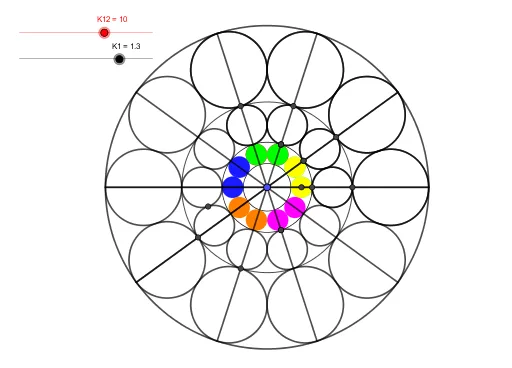
This example demonstrates the construction and properties of concentric layers of circles. It involves core math concepts like circles, equations, multiplication, probability, squares, exponents, and logarithms. The construction uses GeoGebra commands such as Circle, Intersect, Rotate, Polygon, Segment, and Line. Suitable for K12 and K1-K10 levels, it is ideal for geometry construction teaching and exploration.
GeoGebra Commands & Parameters
Circle(A, K2 - K1) → cCircle(B, K1) → dIntersect(c, d) → C, , ,Rotate(d, K7°, A) → d'Intersect(d', d) → D, E, ,Rotate(d', K7°, A) → d''Rotate(d'', K7°, A) → d'''Rotate(d''', K7°, A) → eRotate(e, K7°, A) → e'Rotate(e', K7°, A) → e''Rotate(e'', K7°, A) → e'''Rotate(e''', K7°, A) → fRotate(f, K7°, A) → f'Rotate(f', K7°, A) → f''Rotate(f'', K7°, A) → f'''Rotate(f''', K7°, A) → gRotate(g, K7°, A) → g'Circle(F, T1) → hRotate(h, K7°, A) → h'Rotate(h', K7°, A) → h''Rotate(h'', K7°, A) → h'''Rotate(h''', K7°, A) → kRotate(k, K7°, A) → k'Rotate(k', K7°, A) → k''Rotate(k'', K7°, A) → k'''Rotate(k''', K7°, A) → pRotate(p, K7°, A) → p'Rotate(p', K7°, A) → p''Rotate(p'', K7°, A) → p'''Rotate(p''', K7°, A) → qRotate(q, K7°, A) → q'Circle(G, T2) → rRotate(r, K7°, A) → r'Rotate(r', K7°, A) → r''Rotate(r'', K7°, A) → r'''Rotate(r''', K7°, A) → sRotate(s, K7°, A) → s'Rotate(s', K7°, A) → s''Rotate(s'', K7°, A) → s'''Rotate(s''', K7°, A) → tRotate(t, K7°, A) → t'Rotate(t', K7°, A) → t''Rotate(t'', K7°, A) → t'''Rotate(t''', K7°, A) → c_1Rotate(c_1, K7°, A) → d_1Intersect(r'', r') → H, I, ,Intersect(k', s', 1) → JIntersect(k', k) → K, M, ,Intersect(k'', k') → L, R_2, ,Intersect(s'', s''') → O, P, ,Polygon(Q, R, 6) → polygon1, i, V, j, l, m, n, a, S, T, USegment(A, G) → bRotate(A, K7°, A) → A'Rotate(G, K7°, A) → G'Segment(A', G') → b'Line(A, G) → f_1Rotate(f_1, K7°, A) → g_1Rotate(g_1, K7°, A) → h_1Rotate(h_1, K7°, A) → i_1Rotate(i_1, K7°, A) → j_1Rotate(j_1, K7°, A) → k_1Rotate(k_1, K7°, A) → l_1Intersect(d, h') → W, , ,Intersect(d', h') → A_1, I_2, ,Intersect(d'', h'') → B_1, J_2, ,Intersect(h, r) → D_1, O_2, ,Intersect(g, q) → E_1, K_2, ,Intersect(k'', s'') → F_1, P_2, ,Intersect(k''', s''') → G_1, Q_2, ,Intersect(p, f) → H_1, L_2, ,Circle(A, K1 + K2) → e_1Circle(A, D_1) → p_1Intersect(d, e_1) → J_1, , ,Intersect(d', e_1) → K_1, , ,Circle(A, R2 + T2) → q_1Intersect(q_1, l_1) → L_1, M_1Segment(M_1, L_1) → m_1Intersect(q_1, g_1) → N_1, O_1Intersect(q_1, h_1) → P_1, Q_1Intersect(q_1, i_1) → R_1, S_1Intersect(q_1, j_1) → T_1, U_1Intersect(q_1, k_1) → V_1, W_1Intersect(f_1, xAxis) → Z_1Intersect(f_1, xAxis) → A_2Intersect(f_1, xAxis) → B_2Intersect(f_1, xAxis) → C_2Intersect(f_1, xAxis) → D_2Intersect(f_1, r_1) → E_2Intersect(q_1, r_1) → F_2, G_2Segment(F_2, G_2) → n_1Segment(P_1, Q_1) → s_1Segment(W_1, V_1) → t_1Segment(N_1, O_1) → a_1Segment(U_1, T_1) → b_1Segment(R_1, S_1) → f_2Circle(A, O_2) → c_2Circle(A, Z) → d_2Intersect(r', h') → C_1, , ,Intersect(r'', h'') → I_1, , ,Intersect(r''', h''') → H_2, , ,
AI Drawing Prompt Reference
Draw a set of concentric circular layers centered on a point. Start with two intersecting circles, mark their intersection, then repeatedly rotate one circle around the center by a fixed angle to create a series of overlapping rings, forming a petal-like pattern. Next, place a smaller circle at another point and rotate it similarly to build an inner motif. Then, from a third point, draw a larger circle and repeat the rotations to add an outer decoration. Finally, mark intersections between rotated circles and connect some of them to reveal a geometric grid. The result is a symmetric, repeating array of circles with clear layered depth.
The prompt above was compiled from the original drawing commands and is for reference only.