
Comparing Trig Ratios of Similar Right Triangles
Loading the math board and drawing, please wait…
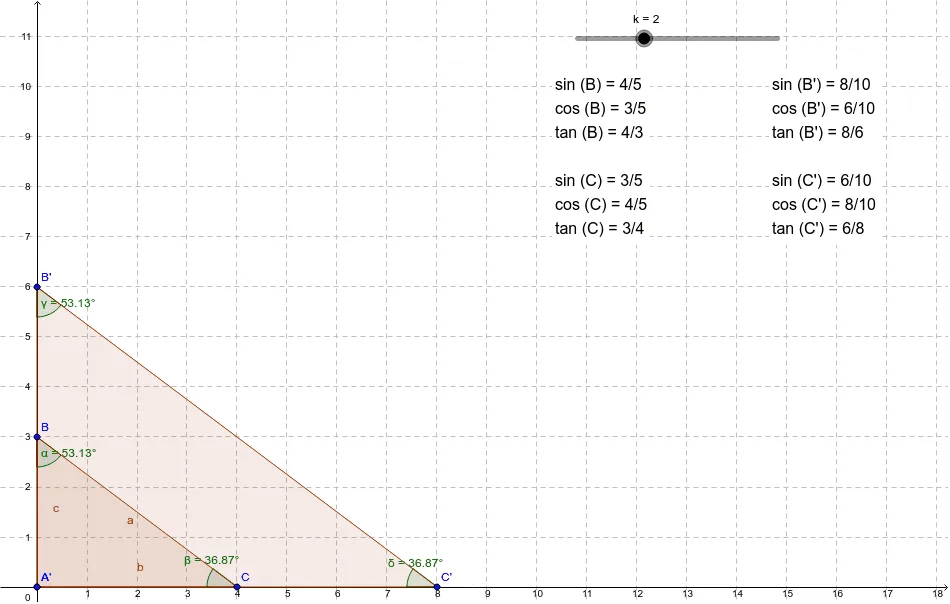
This example demonstrates how to compare trigonometric ratios between a triangle and its dilated version using a slider to control the scale factor. Key math concepts include trigonometry, similar triangles, and geometric transformations. The construction uses Polygon, Angle, and Dilate commands to create and transform triangles, measure angles, and label key elements. Suitable for high school students to explore properties of similar triangles and the invariance of trigonometric ratios under dilation.
GeoGebra Commands & Parameters
Polygon(A, B, C) → poly1, c, a, bAngle(A, B, C) → αAngle(B, C, A) → βDilate(A, k, A) → A'Dilate(B, k, A) → B'Dilate(C, k, A) → C'Polygon(A', B', C') → poly1', c', a', b'Angle(A, B', C') → γAngle(B', C', A) → δ
AI Drawing Prompt Reference
Draw two similar right triangles, one as the original triangle and the other as a dilated version controlled by a slider. Measure and label the three angles of the original triangle. Adjust the scale factor using the slider to observe the changes in the angles of the dilated triangle and verify the invariance of trigonometric ratios.
The prompt above was compiled from the original drawing commands and is for reference only.