
Comparing Parabolas
Loading the math board and drawing, please wait…
In collections
TRANSFORMATION OF FUNCTIONS
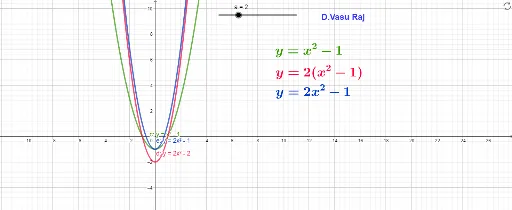
This example demonstrates how to dynamically compare different parabolas by adjusting parameters. It involves core math concepts like parabola equations, parameter effects, and coordinate geometry. Construction highlights include GeoGebra objects: a, c, d, e (parameters), text1, text2, text3, text4 (texts). Suitable for high school students learning coordinate geometry to understand the impact of parameter changes on parabola shapes.
GeoGebra Commands & Parameters
Numeric a(2)y = x^(2) - 1y = (a * (x^(2) - 1))y = (a * x^(2)) - 1
AI Drawing Prompt Reference
Draw a coordinate plane with three parabolas for comparison. First, plot a standard upward-opening parabola with vertex at (0,-1), given by y=x²-1. Then, draw a second parabola obtained by vertically stretching the first by a factor of 2, i.e., y=2(x²-1), with vertex at (0,-2) and a narrower opening. Finally, plot a third parabola with equation y=2x²-1, vertex back at (0,-1), but narrower than the first. Label each curve with its equation, and display the parameter value a=2 to illustrate how changing the parameter affects the parabola's shape and position.
The prompt above was compiled from the original drawing commands and is for reference only.