
Compare Numbers with Number Line
Loading the math board and drawing, please wait…
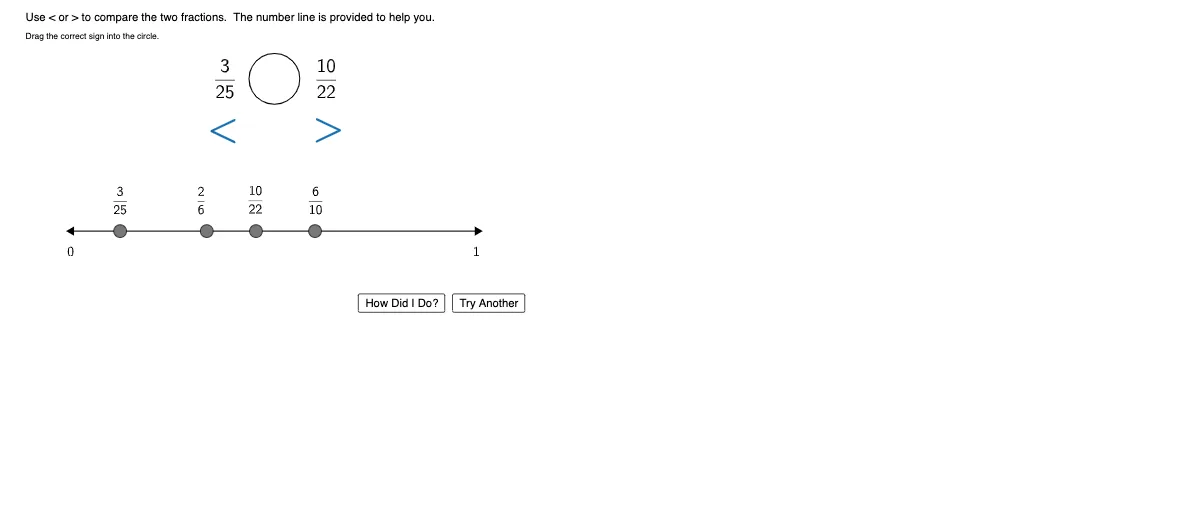
This example demonstrates how to visually compare two numbers using a number line. Core math concepts include number line, number comparison, and inequalities. It is constructed using GeoGebra commands/objects like Segment, Sequence, Random, GCD, Distance, RandomElement, Circle, Element, and Text. Suitable for elementary or middle school mathematics education to help students understand the visual relationship between number lines and number comparisons.
GeoGebra Commands & Parameters
Segment((0, 0), EndPointRight) → NumberLineLengthSequence(Text[i, ((NumberLineLength / (upperbound - lowerbound) * i) - 0.15 - (NumberLineLength / (upperbound - lowerbound) * lowerbound), -1), true, true], i, 0, upperbound, IncrementLabel) → LabelsPositiveSequence(Text[i, ((NumberLineLength / (upperbound - lowerbound) * i) - 0.35 - (NumberLineLength / (upperbound - lowerbound) * lowerbound), -1), true, true], i, (-IncrementLabel), lowerbound, (-IncrementLabel)) → LabelsNegativeSequence(((NumberLineLength / (((upperbound - lowerbound) * split)) * i), 0), i, 0, ((upperbound - lowerbound) * split)) → InBetweenSequence(Text[i, ((NumberLineLength / (upperbound - lowerbound) * i) - 0.15 - (NumberLineLength / (upperbound - lowerbound) * lowerbound), -1), true, true], i, 0, upperbound, 1) → LabelsBetweenRandom(2, upperbound) → rdRandom(1, upperbound) → rnSequence(((NumberLineLength / (upperbound - lowerbound) * i), 0), i, 0, upperbound - lowerbound, IncrementLabel) → RangeGCD(rd, rn) → gcdGCD(rd, rn) → gRandom(2, upperbound) → rd_1Random(1, upperbound) → rn_1GCD(rd_1, rn_1) → gcd_1GCD(rd_1, rn_1) → g_1Random(2, upperbound) → rd_2Random(1, upperbound) → rn_2GCD(rd_2, rn_2) → gcd_2GCD(rd_2, rn_2) → g_2Random(2, upperbound) → rd_3Random(1, upperbound) → rn_3GCD(rd_3, rn_3) → gcd_3GCD(rd_3, rn_3) → g_3Distance(A, B) → distancecheckRandomElement(PickTwo) → RandomPick1RandomElement(PickTwo) → RandomPick2Circle(place, 1) → cSegment(comparepoint1, place) → segment1Segment(comparepoint2, place) → segment2Segment(comparepoint3, place) → segment3Circle(comparepoint1, 0.7) → hidepoint1Circle(comparepoint3, 0.7) → hidepoint3Circle(comparepoint2, 0.7) → hidepoint2Circle(place, 1) → circleoutlineElement(PickTwoNumeric, IndexOf[RandomPick1, PickTwo]) → RandomPickNumeric1Element(PickTwoNumeric, IndexOf[RandomPick2, PickTwo]) → RandomPickNumeric2Text("Drag the correct sign into the circle.") → text1Text("Use < or > to compare the two fractions. The number line is provided to help you.") → text2
AI Drawing Prompt Reference
Draw a horizontal number line with evenly spaced integer labels from negative to positive values. Place two randomly generated proper fraction points above the line, marked in distinct colors. Between these points, draw an empty circle to hold a comparison sign. Connect each fraction point to the circle with a line segment. Below the line, add text instructing to drag the correct sign (< or >) into the circle to compare the two fractions. Keep the layout clear for educational use.
The prompt above was compiled from the original drawing commands and is for reference only.