
Compare and Order Decimals
Loading the math board and drawing, please wait…
In collections
Ordnen und Vergleichen von Bruchzahlen
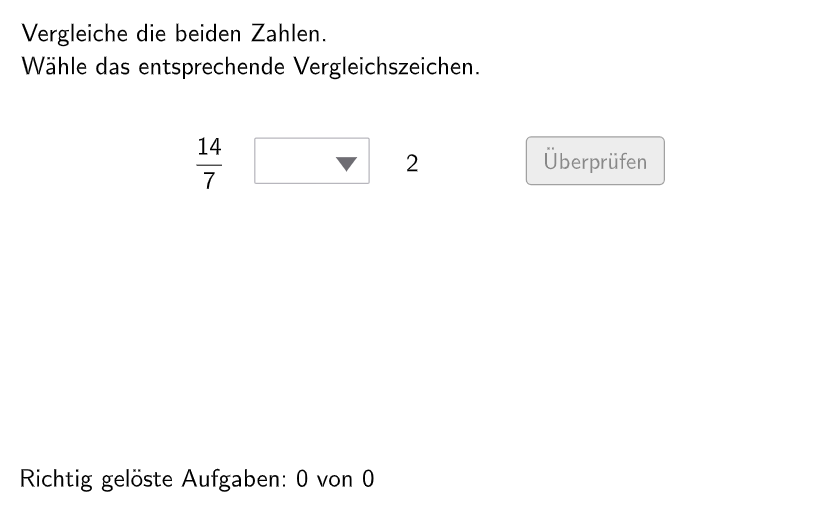
This example helps students understand the comparison and ordering of decimals through interactive exercises. It uses commands like Slider Animation and Conditional Statements to guide students in practicing decimal comparisons. Suitable for students in grades 5-6.
GeoGebra Commands & Parameters
Shuffle(Sequence[RandomElement[{2, 3, 4, 5, 6, 7, 8, 9, 10, 12, 15, 24}], i, 1, 100]) → randomB, {7, 7, 24, 9, 4, 5, 3, 9, 15, 3, 8, 3, 7, 5, 2, 2, 3, 24, 10, 4, 5, 24, 12, 6, 12, 5, 7, 2, 5, 10, 5, 9, 15, 15, 7, 3, 6, 5, 15, 4, 5, 2, 2, 3, 2, 2, 4, 6, 9, 9, 8, 3, 6, 10, 3, 15, 4, 15, 12, 7, 6, 2, 7, 2, 6, 10, 3, 12, 9, 7, 10, 8, 15, 10, 12, 24, 3, 10, 15, 5, 9, 8, 12, 24, 9, 15, 8, 24, 8, 8, 6, 12, 10, 10, 9, 24, 9, 7, 3, 3}Element(randomB, Mod[questionCount, 100] + 1) → numBShuffle(Sequence[RandomElement[{2, 3, 4, 5, 6, 7, 8, 9, 10, 12, 15, 24}], i, 1, 100] \ {numB}) → randomD, {8, 2, 3, 15, 15, 2, 5, 6, 6, 6, 6, 12, 6, 15, 10, 8, 2, 9, 9, 9, 8, 3, 10, 8, 4, 15, 6, 24, 15, 24, 12, 10, 5, 3, 5, 8, 12, 8, 5, 8, 2, 5, 8, 10, 24, 2, 6, 8, 2, 8, 12, 10, 5, 9, 2, 15, 12, 12, 4, 15, 9, 4, 15, 3, 15, 15, 6, 3, 10, 10, 12, 9, 2, 12, 3, 8, 4, 5, 15, 24, 10, 9, 6, 9, 4, 12, 8, 5, 8, 24, 9, 4, 24, 15}Element(randomD, Mod[questionCount, 100] + 1) → numDShuffle(Sequence[Random[1, (2 * numB)], i, 1, 100]) → randomA, {7, 1, 10, 7, 11, 1, 10, 9, 13, 5, 8, 11, 3, 12, 3, 13, 8, 9, 5, 14, 11, 9, 2, 14, 5, 4, 6, 2, 12, 6, 8, 7, 5, 9, 11, 9, 12, 7, 14, 14, 13, 14, 12, 5, 2, 7, 11, 12, 5, 14, 3, 7, 8, 9, 6, 7, 7, 11, 2, 13, 1, 3, 1, 3, 8, 4, 2, 13, 14, 8, 10, 9, 8, 6, 2, 7, 11, 5, 13, 7, 14, 13, 6, 3, 7, 2, 14, 2, 6, 5, 8, 6, 9, 7, 4, 1, 5, 11, 1, 12}Shuffle(Sequence[RandomElement[{0, 1}], i, 1, 100]) → modelist, {1, 1, 1, 1, 0, 0, 1, 1, 0, 0, 0, 0, 1, 0, 1, 1, 0, 1, 1, 1, 0, 0, 0, 0, 0, 1, 1, 0, 1, 0, 1, 1, 0, 0, 1, 1, 0, 1, 1, 1, 1, 1, 1, 1, 1, 0, 1, 1, 0, 0, 1, 0, 0, 1, 0, 0, 1, 0, 0, 0, 1, 1, 1, 0, 1, 0, 0, 1, 1, 1, 1, 0, 1, 0, 1, 1, 0, 1, 0, 1, 1, 0, 0, 1, 0, 1, 0, 1, 1, 0, 0, 0, 0, 1, 0, 1, 0, 1, 0, 0}Element(modelist, Mod[questionCount, 100] + 1) → modeShuffle(Sequence[Random[1, (2 * numD)], i, 1, 100] \ {numA}) → randomC, {8, 15, 8, 8, 3, 3, 4, 11, 1, 13, 2, 12, 5, 15, 1, 8, 5, 7, 2, 1, 11, 16, 10, 12, 6, 10, 1, 13, 16, 11, 1, 15, 3, 4, 3, 2, 6, 6, 13, 6, 1, 11, 5, 7, 1, 2, 10, 9, 5, 8, 6, 8, 4, 8, 4, 2, 12, 2, 10, 8, 7, 11, 7, 3, 5, 15, 6, 1, 5, 5, 5, 8, 16, 5, 9, 7, 13, 1, 10, 7, 8, 4, 10, 15, 7, 6, 5, 10, 15, 5, 8, 8, 8, 6}Textfield(input1) → InputBox1Textfield(input2) → InputBox2Polygon(PtopLeftCornerFeedback, PtopRightCornerFeedback, PbottomRightCornerFeedback, PbottomLeftCornerFeedback) → rectangleCorrect, rectangleCorrectS3, rectangleCorrectS4, rectangleCorrectS2, rectangleCorrectS1Shuffle(Sequence[Random[0, 10], i, 1, 100]) → randomNosForX, {8, 1, 8, 8, 2, 8, 5, 6, 1, 5, 6, 8, 5, 1, 1, 1, 2, 7, 8, 10, 4, 7, 4, 6, 3, 2, 0, 1, 0, 7, 0, 0, 8, 8, 10, 7, 4, 7, 9, 6, 2, 8, 8, 7, 1, 5, 9, 6, 5, 10, 5, 3, 9, 7, 4, 5, 9, 7, 2, 2, 3, 6, 7, 8, 5, 7, 4, 8, 3, 10, 8, 6, 0, 8, 9, 9, 8, 1, 4, 6, 2, 10, 0, 7, 6, 8, 10, 0, 1, 9, 7, 4, 5, 0, 5, 3, 3, 4, 5, 9}Element(randomNosForX, Mod[questionCount, 100] + 1) → numXShuffle(Sequence[Random[0, 10], i, 1, 100]) → randomNosForY, {3, 7, 8, 9, 0, 0, 1, 7, 4, 8, 6, 8, 5, 9, 0, 1, 0, 3, 5, 3, 9, 1, 9, 5, 10, 5, 10, 1, 5, 3, 4, 2, 6, 0, 4, 0, 9, 2, 2, 9, 4, 5, 0, 9, 2, 9, 3, 10, 3, 5, 3, 9, 3, 2, 9, 0, 10, 4, 5, 4, 4, 0, 6, 5, 5, 5, 1, 6, 5, 0, 3, 10, 6, 5, 9, 4, 10, 4, 3, 8, 8, 2, 5, 0, 7, 2, 4, 8, 6, 0, 6, 0, 8, 0, 7, 0, 6, 6, 0, 8}Element(randomNosForY, Mod[questionCount, 100] + 1) → numYAppend(true, Sequence[If[randomNosForX(i) ≟ randomNosForX(i - 1), false, true], i, 2, 100]) → stayXAppend(true, Sequence[If[randomNosForY(i) ≟ randomNosForY(i - 1), false, true], i, 2, 100]) → stayYRemove(Sequence[If[stayX(i), randomNosForX(i), 0], i, 1, 100], Sequence[0, i, 1, 100]) → randomNosForXwithoutRepeatRemove(Sequence[If[stayY(i), randomNosForY(i), 0], i, 1, 100], Sequence[0, i, 1, 100]) → randomNosForYwithoutRepeatElement(randomNosForXwithoutRepeat, Mod[questionCount, Length[randomNosForXwithoutRepeat]] + 1) → numXwithoutRepeatElement(randomNosForYwithoutRepeat, Mod[questionCount, Length[randomNosForYwithoutRepeat]] + 1) → numYwithoutRepeatReverse(Sequence[Mod[floor(numLeft / 10^(i)), 10], i, -15, 0]) → splitRoundNumber
AI Drawing Prompt Reference
Draw a graph that compares two numbers, numB and numD, within a rectangle, with the left bottom and right bottom corners marked as 0 and 10. The size and color of the numbers change based on the comparison result, which is determined by mode. When mode is 0, numB is greater than numD; when mode is 1, numB is less than numD; when mode is 2, numB is equal to numD.
The prompt above was compiled from the original drawing commands and is for reference only.