
Classifying Rational Numbers
Loading the math board and drawing, please wait…
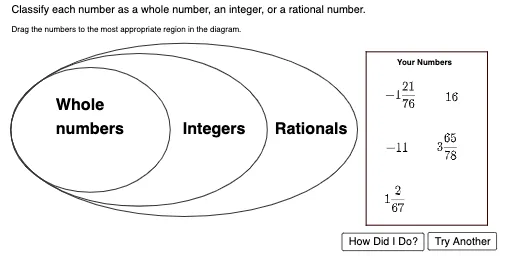
This example demonstrates how to classify numbers as whole numbers, integers, or rational numbers using GeoGebra. It involves core math concepts like integers, rational numbers, classification, and comparison. Key GeoGebra commands and objects used include Segment, Circle, Random, Sum, Text, Polygon, point1, center, circle1, circle2, circle3, etc., to visualize the classification process. Suitable for middle school and above mathematics education, helping students understand and apply rational number classification concepts.
GeoGebra Commands & Parameters
Segment(center, point1) → SegRad1Circle(center, CircRad3) → circle3Circle(center, CircRad2) → circle2Circle(center, CircRad1) → circle1Random(0, 99) → RandNum1Random(0, 99) → RandNum2Random(1, 3) → diceroll1Circle(point1, 1) → HidePoint1Random(1, 9) → RandNum3Random(1, 2) → dicerollnegativeCircle(point2, 1) → HidePoint2Sum({count1, count2, count3, count4, count5}) → HelperFunction1Random(1, 3) → diceroll2Random(1, 3) → diceroll3Random(1, 3) → diceroll4Random(1, 3) → diceroll5Segment(center, point2) → SegRad2Segment(center, point3) → SegRad3Segment(center, point4) → SegRad4Segment(center, point5) → SegRad5Circle(point3, 1) → HidePoint3Circle(point4, 1) → HidePoint4Circle(point5, 1) → HidePoint5Circle(center, CircRad1) → circleshade1Circle(center, CircRad2) → circleshade2Circle(center, CircRad3) → circleshade3Circle((16, 2), 1.2) → startcircle2Circle((16, -1), 1.2) → startcircle3Circle((16, -4), 1.2) → startcircle4Circle((19, 2), 1.2) → startcircle1Circle((19, -1), 1.2) → startcircle5Text("Drag the numbers to the most appropriate region in the diagram.") → InstText("Your Numbers") → text4Polygon(A, B, C, D) → poly1, a, b, c, dText("Classify each number as a whole number, an integer, or a rational number.") → GenInstructions
AI Drawing Prompt Reference
Draw a diagram to classify rational numbers. The diagram should include segments, circles, and text to represent integers, rational numbers, and whole numbers. The construction order is to create circles and segments first, then generate random numbers, and finally drag numbers to the appropriate regions. The diagram aims to help students understand the classification concept.
The prompt above was compiled from the original drawing commands and is for reference only.