
Circle-Line Intersection Construction in GeoGebra
Loading the math board and drawing, please wait…
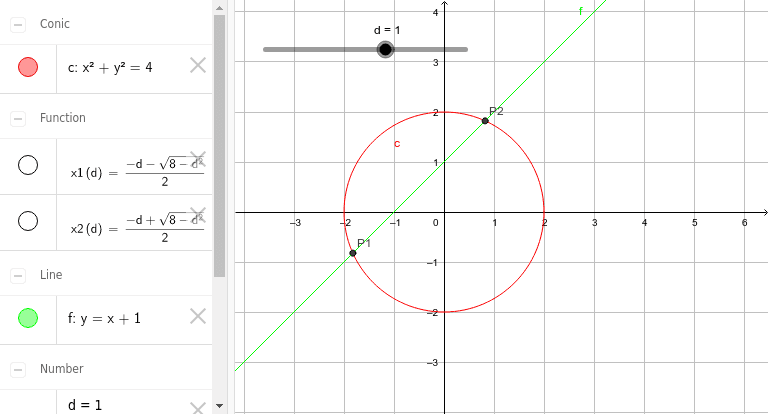
This GeoGebra example demonstrates the intersection of a circle and a line in the Cartesian plane, visually linking algebraic solutions to geometric points. Core mathematical concepts include circle equations, line equations, systems of linear and quadratic equations, discriminant analysis for secant, tangent, and non-intersecting cases, and coordinate geometry. The construction relies on GeoGebra objects c (circle), d (line), f (auxiliary function or expression), x1 and x2 (solution coordinates or roots), and P1/P2 (intersection point objects), supporting dynamic dragging and real-time visualization. It is suitable for high school analytic geometry, introductory calculus, and GeoGebra-based mathematics instruction, helping learners master the graphical features and computational methods of circle-line intersection, tangency, and separation.
GeoGebra Commands & Parameters
x^(2) + y^(2) = 4Numeric d(1.0)y = x + dx1(d) = ((-d) - sqrt(8 - d^(2))) / 2x2(d) = ((-d) + sqrt(8 - d^(2))) / 2(x1(d), x1(d) + d)(x2(d), x2(d) + d)
AI Drawing Prompt Reference
Draw a circle centered at the origin with radius 2, and a line of slope 1 whose y‑intercept d can be varied. As d changes, show the intersection points of the line with the circle. When the line cuts the circle there are two intersection points; when it is tangent there is one; when it misses the circle there are none. The intersection coordinates come from solving the system of the circle and line equations and move dynamically with d.
The prompt above was compiled from the original drawing commands and is for reference only.