
Circle Area Formula Animation (Parallelogram)
Loading the math board and drawing, please wait…
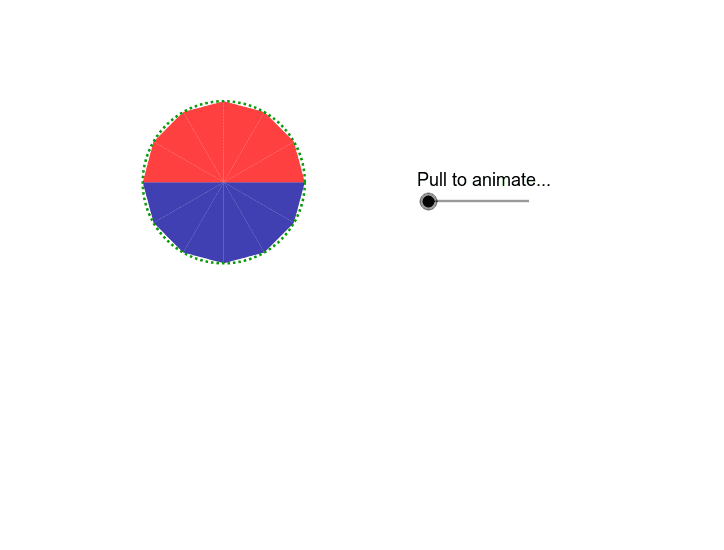
This example demonstrates how to derive the area of a circle by approximating it with a parallelogram through animation. Key math concepts include circle, area, parallelogram, multiplication, linear equations, and step functions. Construction highlights the use of GeoGebra commands and objects like Circle, Point, Vector, Translate, Rotate, Line, Angle, Mirror, Polygon, OrthogonalLine, Segment. Suitable for middle school and above to understand the derivation of the circle area formula.
GeoGebra Commands & Parameters
Circle(A, a) → cPoint(c) → BVector(B, A) → uTranslate(C, Vector[(-u)]) → C'_2Rotate(C'_2, ((g / 100 * 15))°, C'_2) → C''_2Line(B, A) → bRotate(B, 30*°, A) → B'Angle(B, A, B') → αLine(B', A) → dCircle(C, a) → eVector(A, B') → vVector(B, B') → wTranslate(C, v) → C'_1Rotate(C'_2, 60*°, C) → C''_1Rotate(C'_1, 60*°, C) → DLine(C'_2, C) → fMirror(C'_1, f) → EMirror(C''_1, f) → C'''Mirror(D, f) → D'Polygon(E, C'_2, C) → poly1, c_1, e_1, c'Rotate(E, ((g / 100 * 15))°, C'_2) → E'_1Rotate(C, ((g / 100 * 15))°, C'_2) → C'_3Polygon(E'_1, C''_2, C'_3) → poly1', c'_1, e', c''Polygon(C''', E, C) → poly2, c_2, c''', e_2Rotate(C''', (g / 100 * β), F) → GRotate(E, (g / 100 * β), F) → E'Rotate(C, (g / 100 * β), F) → C'_4Polygon(G, E', C'_4) → poly2', c'_2, g_1, e'_1Polygon(C, D', C''') → poly3, c'''_1, c_3, d'Rotate(C, (g / 100 * γ), H) → C'Rotate(D', (g / 100 * γ), H) → D''Rotate(C''', (g / 100 * γ), H) → IPolygon(C', D'', I) → poly3', i, c'_3, d''Mirror(C', f) → C''_3Mirror(D'', f) → D'''_1Mirror(I, f) → I'_1Polygon(C''_3, D'''_1, I'_1) → poly3''_1, i', c''_1, d'''Mirror(G, f) → G'_1Mirror(E', f) → E''_1Mirror(C'_4, f) → JPolygon(G'_1, E''_1, J) → poly2''_1, j, g', e''Mirror(E'_1, f) → KMirror(C''_2, f) → LMirror(C'_3, f) → MPolygon(K, L, M) → poly1''_1, m, k, lOrthogonalLine(C, f) → hMirror(C', h) → C''Mirror(D'', h) → D'''Mirror(I, h) → I'Polygon(C'', D''', I') → poly3'', i'_1, c''_2, d'''_1Mirror(G, h) → G'Mirror(E', h) → E''Mirror(C'_4, h) → NPolygon(G', E'', N) → poly2'', n, g'_1, e''_1Mirror(E'_1, h) → OMirror(C''_2, h) → PMirror(C'_3, h) → QPolygon(O, P, Q) → poly1'', q, o, pMirror(K, h) → K'Mirror(L, h) → L'Mirror(M, h) → M'Polygon(K', L', M') → poly4, m', k', l'Mirror(G'_1, h) → RMirror(E''_1, h) → SMirror(J, h) → J'Polygon(R, S, J') → poly5, j', r, sMirror(C''_3, h) → TMirror(D'''_1, h) → UMirror(I'_1, h) → VPolygon(T, U, V) → poly6, v_1, t, u_1Vector((0, 0), (-3.27, 2.09)) → offsetvectorPoint(c) → WRotate(W, 30*°, A) → W'Angle(W, A, W') → δVector(W', W) → zVector(W', A) → w_1Polygon(TestPoint, E_1, D_1, J_1, TestB, Z, F_1, A_1, G_1, B_1, H_1, C_1, I_1) → poly7, testpoint, i_1, d_1, j_1, testb, e_3, z_1, f_1, a_1, g_2, b_1, h_1, c_4Translate(TestPoint, Vector[((g - 100) / 100 * w_1)]) → TestPoint'_1Translate(E_1, Vector[((g - 100) / 100 * w_1)]) → K_1Translate(Z, Vector[((g - 100) / 100 * w_1)]) → Z'_1Translate(F_1, Vector[((g - 100) / 100 * w_1)]) → L_1Translate(A_1, Vector[((g - 100) / 100 * w_1)]) → M_1Translate(G_1, Vector[((g - 100) / 100 * w_1)]) → N_1Translate(B_1, Vector[((g - 100) / 100 * w_1)]) → O_1Translate(H_1, Vector[((g - 100) / 100 * w_1)]) → P_1Translate(C_1, Vector[((g - 100) / 100 * w_1)]) → Q_1Translate(I_1, Vector[((g - 100) / 100 * w_1)]) → R_1Translate(D_1, Vector[((g - 100) / 100 * w_1)]) → S_1Translate(J_1, Vector[((g - 100) / 100 * w_1)]) → T_1Translate(TestB, Vector[((g - 100) / 100 * w_1)]) → TestB'_1Polygon(TestPoint'_1, K_1, S_1, T_1, TestB'_1, Z'_1, L_1, M_1, N_1, O_1, P_1, Q_1, R_1) → poly7'_1, testpoint', r_1, s_1, t_1, testb', k_1, z', l_1, m_1, n_1, o_1, p_1, q_1Mirror(TestPoint, h) → TestPoint'Mirror(E_1, h) → U_1Mirror(Z, h) → Z'Mirror(F_1, h) → V_1Mirror(A_1, h) → W_1Mirror(G_1, h) → Z_1Mirror(B_1, h) → A_2Mirror(H_1, h) → B_2Mirror(C_1, h) → C_2Mirror(I_1, h) → D_2Mirror(D_1, h) → E_2Mirror(J_1, h) → F_2Mirror(TestB, h) → TestB'Polygon(TestPoint', U_1, E_2, F_2, TestB', Z', V_1, W_1, Z_1, A_2, B_2, C_2, D_2) → poly7', testpoint'_1, d_2, e_4, f_2, testb'_1, u_2, z'_1, v_2, w_2, z_2, a_2, b_2, c_5Segment(G_2, H_2) → h_2Segment(I_2, J_2) → i_2
AI Drawing Prompt Reference
Create an animation demonstrating how to derive the area of a circle by approximating it with a parallelogram. Start by drawing a circle and a radius from the center to the circumference. Then, rotate and replicate this radius multiple times to form a series of parallelograms whose areas approach the circle's area. The animation should show the parallelograms rotating and reflecting to eventually form the circle, highlighting key geometric elements like the circle, radius, and angles to clearly illustrate the derivation process.
The prompt above was compiled from the original drawing commands and is for reference only.