
Calculating the Area of a Triangle
Loading the math board and drawing, please wait…
In collections
Area, Surface Area, Volume--Nets
Area, perimeter and volume of shapes
Area and Surface Area
Area and Surface Area
Area, Perimeter and Volume of shapes
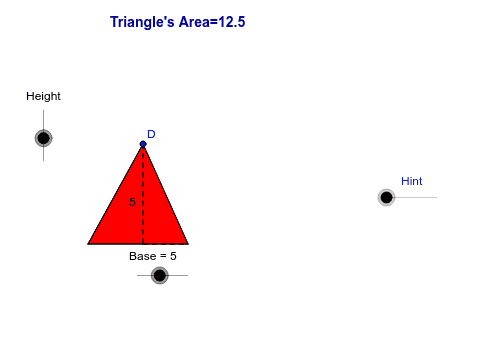
This example demonstrates how to calculate the area of a triangle by constructing its height and base. The core mathematical concepts involved include the formula for the area of a triangle, geometric constructions, and coordinate geometry applications. Key construction steps using GeoGebra commands include Circle, Point, Segment, Line, OrthogonalLine, Intersect, Tangent, Polygon, Midpoint, If, Rotate; and objects such as A, Height, Base, c, d, B, e, f, g, C, h, a, D, P, d_1, a_1, b_1, i, E, j, k, F, G, H, p, I, l, m, J, K, L, n, q, α, A', B', D', P', d', a'. Suitable for middle school students and above to learn geometric calculation methods.
GeoGebra Commands & Parameters
Circle(A, Height) → cCircle(A, Base) → dPoint(d) → BSegment(A, B) → eLine(A, B) → fOrthogonalLine(A, f) → gIntersect(c, g, 1) → CTangent(C, c) → h, aPoint(h) → DPolygon(A, B, D) → P, d_1, a_1, b_1OrthogonalLine(D, f) → iIntersect(f, i) → ESegment(E, D) → jSegment(E, B) → kMidpoint(D, B) → FMidpoint(D, A) → GPoint(a_1) → HCircle(B, H) → pIntersect(p, d_1, 1) → IOrthogonalLine(H, a_1) → lOrthogonalLine(I, d_1) → mIntersect(l, m) → JIf(x(D) ≟ x(B), G) → KIf(x(D) ≟ x(B), J) → LSegment(L, H) → nSegment(L, I) → qRotate(A, α, K) → A'Rotate(B, α, K) → B'Rotate(D, α, K) → D'Polygon(A', B', D') → P', d', a', b'If(x(D) ≟ x(A), F) → MPoint(b_1) → NCircle(A, N) → rIntersect(r, d_1, 1) → OOrthogonalLine(N, b_1) → sOrthogonalLine(O, d_1) → tIntersect(s, t) → QIf(x(D) ≟ x(A), Q) → RSegment(N, R) → c_1Segment(R, O) → e_1Rotate(A, -α, M) → A'_1Rotate(B, -α, M) → B'_1Rotate(D, -α, M) → D'_1Polygon(A'_1, B'_1, D'_1) → P'_1, d'_1, a'_1, b'_1If(x(D) > x(B), G) → SRotate(A, α, S) → A'_2Rotate(B, α, S) → B'_2Rotate(D, α, S) → D'_2Polygon(A'_2, B'_2, D'_2) → P'_2, d'_2, a'_2, b'_2If(x(D) < x(A), F) → TRotate(A, -α, T) → A'_3Rotate(B, -α, T) → B'_3Rotate(D, -α, T) → D'_3Polygon(A'_3, B'_3, D'_3) → P'_3, d'_3, a'_3, b'_3If((x(D) > x(A)) ∧ (x(D) < x(B)), F) → URotate(A, -α, U) → A'_4Rotate(B, -α, U) → B'_4Rotate(D, -α, U) → D'_4Polygon(A'_4, B'_4, D'_4) → P'_4, d'_4, a'_4, b'_4Midpoint(D, E) → VMidpoint(A, B) → W
AI Drawing Prompt Reference
Draw a triangle by constructing its height and base to calculate the area. First, draw two circles centered at the triangle's vertex and base, then find the intersection points to determine the triangle's vertices. Next, draw the height and base, and calculate the area. Finally, use rotation and reflection to show different positions of the triangle and its area calculation.
The prompt above was compiled from the original drawing commands and is for reference only.