
Calculating Segment Length Using the Pythagorean Theorem
Loading the math board and drawing, please wait…
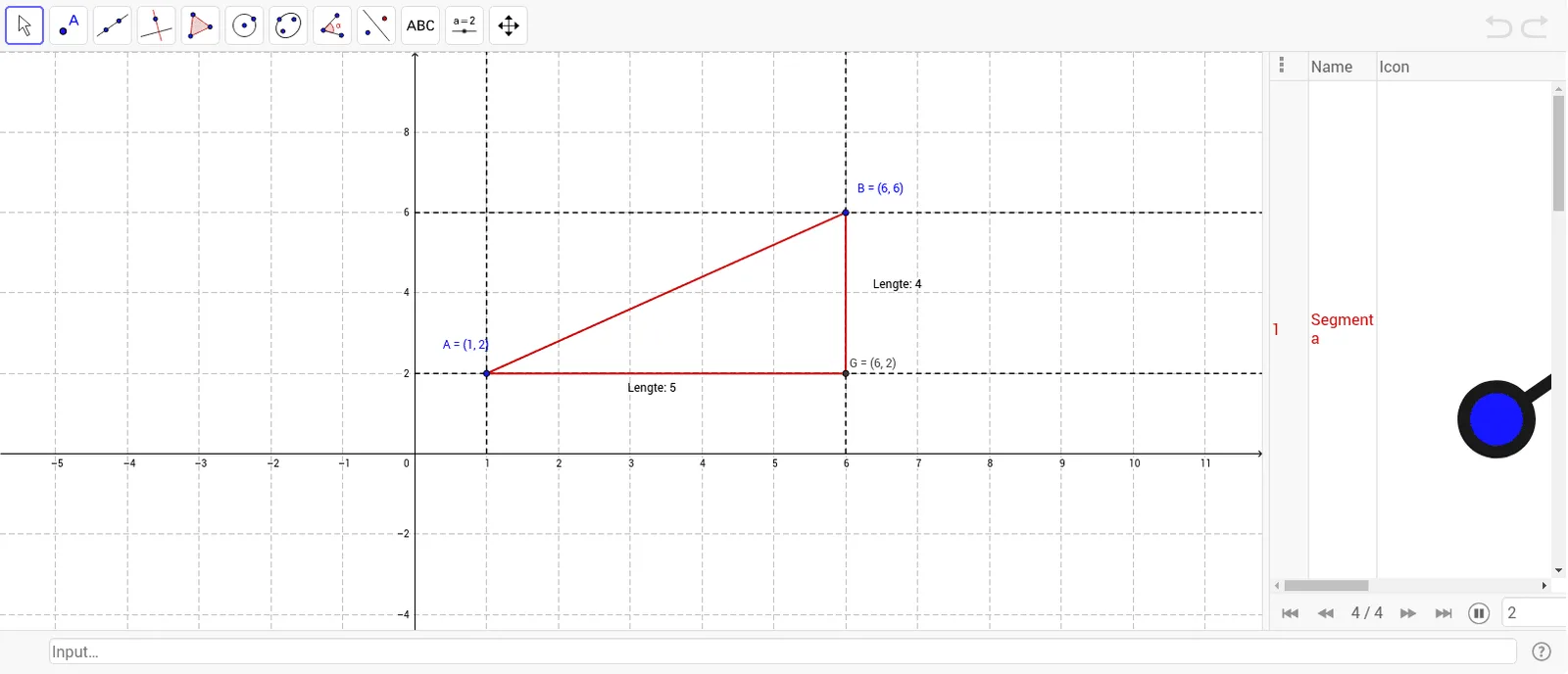
This example shows how to determine the length of a line segment by constructing a right triangle and applying the Pythagorean theorem. Users define two points A and B, then add a third point C to form a right angle. Using GeoGebra commands such as Segment, Point, Ray, and Intersect, the construction creates the necessary geometric objects (A, B, C, D, E, F, etc.) and visual labels. The system automatically computes the length of the hypotenuse AB, confirming the theorem. It is ideal for middle‑school mathematics teachers and students, linking geometric construction with algebraic calculation in coordinate geometry.
GeoGebra Commands & Parameters
Segment(A, B) → aPoint(yAxis) → CPoint(yAxis) → DPoint(xAxis) → EPoint(xAxis) → FRay(D, B) → bRay(C, A) → cRay(E, A) → dRay(F, B) → eIntersect(c, e) → GSegment(A, G) → fSegment(G, B) → g
AI Drawing Prompt Reference
Draw a right triangle with points A and B as the endpoints of the hypotenuse. Points C and D are on the y-axis, and points E and F are on the x-axis. Draw rays from point C to point A and from point D to point B, intersecting at point G. Connect points A to G and G to B to form the right triangle ABC. Calculate the length of the hypotenuse AB to verify the Pythagorean theorem.
The prompt above was compiled from the original drawing commands and is for reference only.