
Calculating Areas of Quadrilaterals
Loading the math board and drawing, please wait…
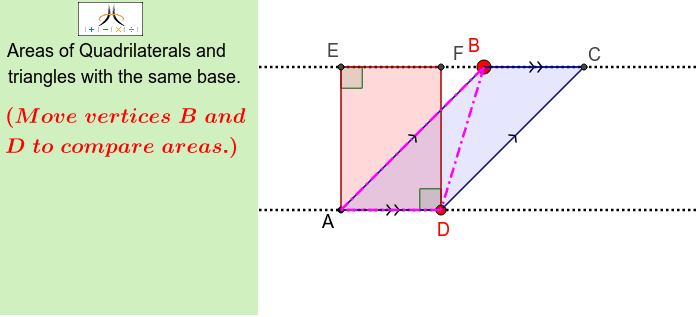
This example demonstrates how to calculate the area of a quadrilateral using coordinates. It involves core math concepts like coordinate geometry, line segments, angles, and definite integrals. Construction highlights include commands like Polygon, PointIn, Line, AngularBisector, Segment, Intersect, Corner, Angle, OrthogonalLine. Suitable for high school geometry instruction and construction learning.
GeoGebra Commands & Parameters
Polygon(J, K, L, M) → poly2, j_1, k_1, l_1, m_1PointIn(poly2) → NLine(A, D) → lPointIn(poly2) → BAngularBisector(B, A, D) → dSegment(D_1, E_1) → eIntersect(e, d) → F_1AngularBisector(D, A, B) → kCorner(1, 1) → Cnr1Corner(1, 2) → Cnr2Corner(1, 3) → Cnr3Corner(1, 4) → Cnr4Polygon(CN1, CN2, CN3, CN4) → Panel, cn1, cn2, cn3, cn4Angle(B, D, A) → γAngle(A, B, D) → εLine(B, l) → aOrthogonalLine(A, l) → bIntersect(a, b) → EOrthogonalLine(D, l) → cIntersect(a, c) → FSegment(A, B) → fLine(D, f) → gIntersect(a, g) → CSegment(E, F) → hSegment(B, C) → iSegment(D, F) → mSegment(A, E) → nSegment(A, D) → pAngle(F, D, A) → αAngle(A, E, F) → βSegment(D, C) → jPolygon(A, E, F, D) → poly1, a_1, g_1, h_1, c_1Polygon(A, B, C, D) → poly3, a_2, b_1, i_1, c_2Polygon(A, B, D) → poly4, c_3, a_3, b_2
AI Drawing Prompt Reference
Draw a quadrilateral ABCD, then select a point N inside it. Draw the perpendicular bisectors of AD and BC, which intersect at point F. Draw the perpendicular bisectors of AB and CD, which intersect at point E. Connect A, B, C, and D to form quadrilateral ABCD. Then draw the diagonals AC and BD of quadrilateral ABCD, which intersect at point F. Finally, draw quadrilaterals ABEF and ACDF.
The prompt above was compiled from the original drawing commands and is for reference only.