
Broken Ruler (Inches) for Measuring Line Segments
Loading the math board and drawing, please wait…
In collections
Elementary School Applets
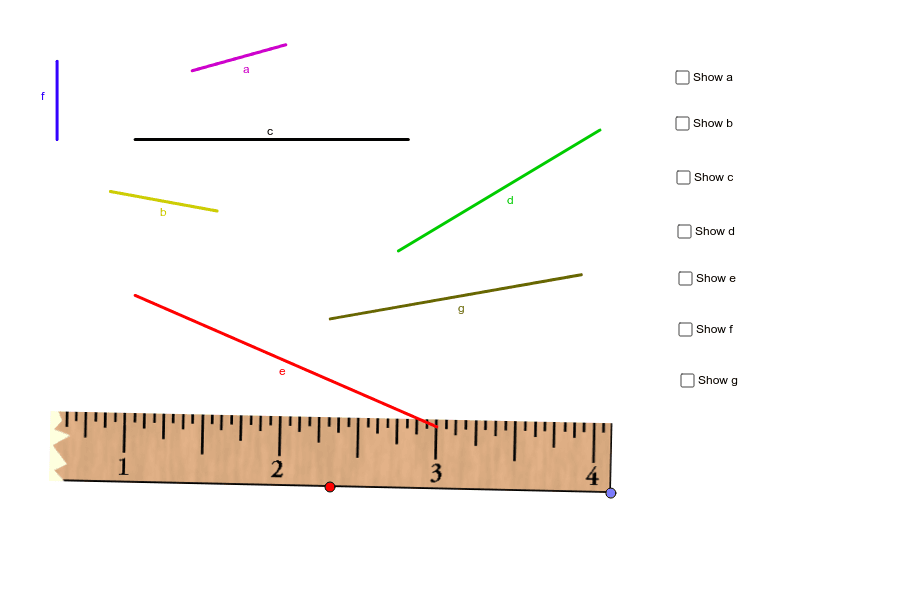
This GeoGebra example presents a broken inch ruler for measuring the lengths of various line segments. It demonstrates the concept of length measurement when the ruler's zero mark is missing, requiring students to use subtraction of coordinates or count intervals. Core math concepts include unit conversion, fractions, integers, and multiplication. The construction uses Point, Segment, and Mirror commands to create the ruler and segments, with a checkbox to reveal answers. Suitable for upper elementary and middle school students to practice non-zero-start measurement, understand scale intervals, and improve estimation and precise reading skills.
GeoGebra Commands & Parameters
Point(Circle[D, a_1]) → ESegment(D, E) → b_1Mirror(E, D) → FSegment(A, B) → cSegment(C, G) → dSegment(H, I) → eSegment(J, K) → fSegment(L, M) → gSegment(N, O) → aSegment(P, Q) → b
AI Drawing Prompt Reference
Draw a horizontal broken inch ruler with its zero mark missing, starting from the 1-inch tick. Place several line segments of varying lengths above or below the ruler, each with distinct endpoints, not overlapping the ruler. Include a draggable slider at one end of the ruler to adjust its position. Add a checkbox in a corner to reveal or hide the measured lengths of the segments. The layout should be clean and educational, emphasizing measurement via coordinate subtraction or counting intervals.
The prompt above was compiled from the original drawing commands and is for reference only.