
Bertrand Paradox - Second Method: Random Chords and Inscribed Equilateral Triang
Loading the math board and drawing, please wait…
In collections
probability
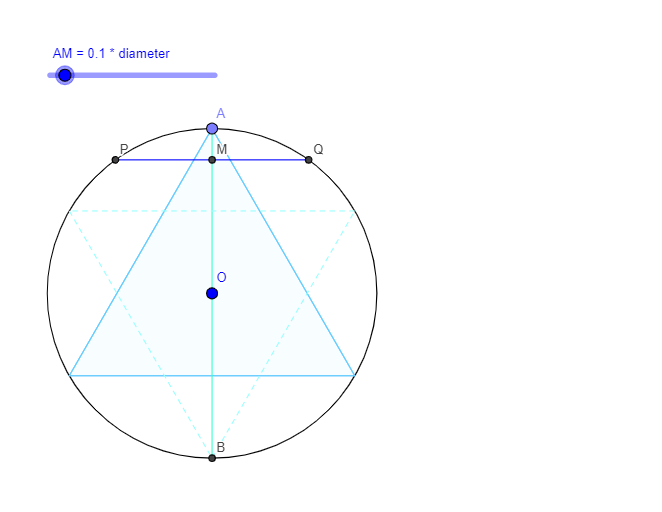
This GeoGebra example demonstrates the second classical method of Bertrand's paradox: randomly selecting a chord in a circle and defining probability by comparing its length with the side of an inscribed equilateral triangle. The core mathematical concepts involve geometric probability, different interpretations of 'randomness' in chord selection, and how the chosen probability model affects the final result. The construction uses commands such as Circle, Point, Tangent, Rotate, Angle, Line, Intersect, Polygon, Segment, and OrthogonalLine to build the circle, tangent lines, the equilateral triangle, and various auxiliary segments. Sliders or parameters control the random chord's orientation and position. This resource is suitable for high school to undergraduate students studying probability, geometric probability, or mathematical paradoxes, and for teachers demonstrating how different probability models yield different answers.
GeoGebra Commands & Parameters
Circle(O, 3) → cPoint(c) → ATangent(A, c) → tangentLine,Point(tangentLine) → B_1Rotate(B_1, α, A) → B'Angle(B_1, A, B') → βRotate(B_1, 60°, A) → B'_1Angle(B_1, A, B'_1) → γLine(A, B'_1) → eIntersect(c, e, 2) → DPolygon(A, D, 3) → poly1, f, g, h, ELine(A, B') → line_{AB}Intersect(c, line_{AB}, 2) → BSegment(A, B) → seg_{AB}Line(A, O) → diamLineIntersect(c, diamLine, 2) → CSegment(A, C) → diamCircle(A, (m * diam)) → MConicIntersect(MConic, diam, 1) → M_{PQ}OrthogonalLine(M_{PQ}, diam) → perpToDiamLineIntersect(c, perpToDiamLine, 2) → QIntersect(c, perpToDiamLine, 1) → PSegment(P, Q) → seg_{PQ}Rotate(A, 30°, C) → A'Angle(A, C, A') → δLine(C, A') → iIntersect(c, i, 2) → FPolygon(F, C, 3) → poly2, j, k, l, GCircle(O, (0.25 * diam)) → dSegment(M_{ST}, O) → seg_{OMST}OrthogonalLine(M_{ST}, seg_{OMST}) → line_{ST}Intersect(c, line_{ST}, 1) → SIntersect(c, line_{ST}, 2) → TSegment(S, T) → seg_{ST}
AI Drawing Prompt Reference
Draw a circle with center O and radius 3. Pick a point A on the circle. Construct the tangent line to the circle at A)Skip. On this tangent line, choose a point B1. Rotate B1 around A by an angle α to get B', and rotate B1 around A by 60° to get B'_1. Draw the line through A and B'_1, intersecting the circle again at D. Form an equilateral triangle with vertices A, D, and a third point (implied). Draw the line through A and B', intersecting the circle at B. Draw the diameter through A and O, intersecting the circle at C. With center A, draw a circle whose radius is m times the length of AC, intersecting the diameter at M. Through M, draw a line perpendicular to the diameter, intersecting the original circle at P and Q. Connect P and Q. Rotate A around C by 30° to get A'. Draw the line through C and A', intersecting the circle at F. Form an equilateral triangle with vertices C, F, and a third point. Finally, with center O, draw a circle of radius one quarter of AC. On this smaller circle, pick a point M_ST. Through M_ST, draw a line perpendicular to OM_ST, intersecting the original circle at S and T. Connect S and T.
The prompt above was compiled from the original drawing commands and is for reference only.