
Beginners Metatron's Cube
Loading the math board and drawing, please wait…
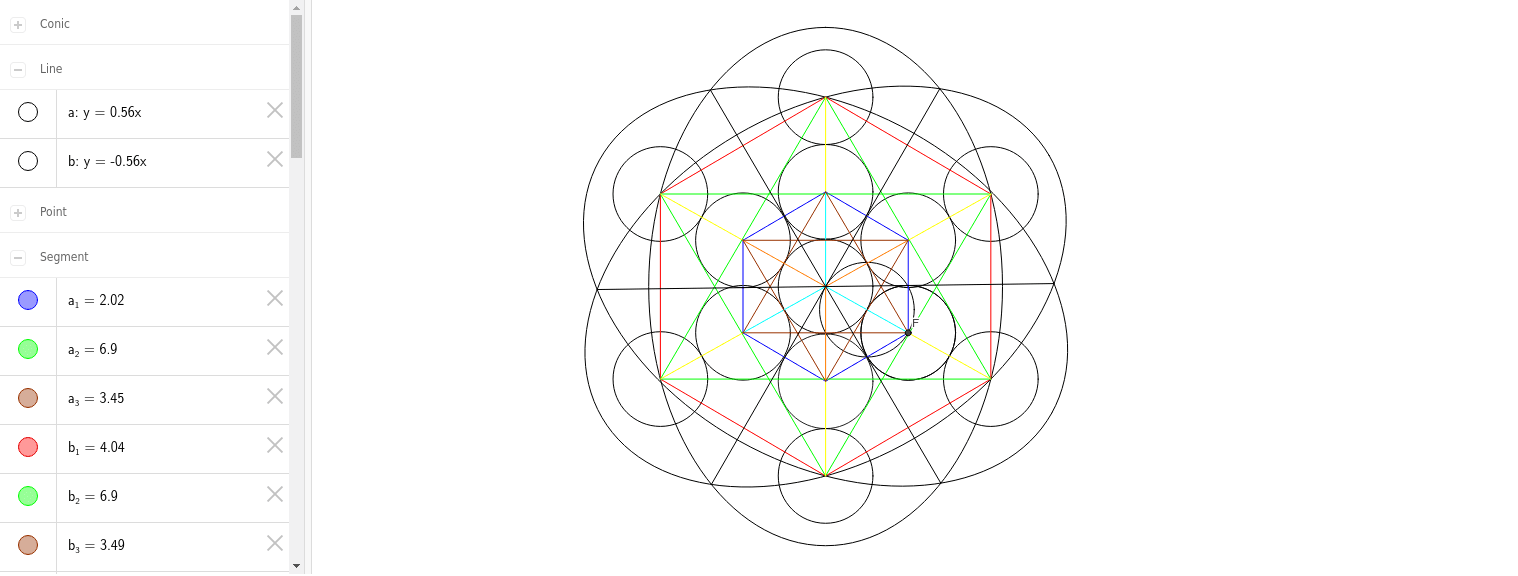
This example demonstrates how to create Metatron's Cube, a geometric figure consisting of 13 circles and lines connecting their centers, showcasing symmetry and spatial relationships. Core math concepts include circles, centroids, line segments, geometric construction, and symmetry. It uses GeoGebra commands like Intersect, Circle, Point, Segment, and Ellipse. Suitable for beginners learning geometric construction, spatial visualization, and symmetry concepts, serving as a foundational tool for geometry education or exploratory learning.
GeoGebra Commands & Parameters
Intersect(a, b) → ACircle(A, B) → cPoint(yAxis) → GIntersect(c, yAxis, 2) → HCircle(G, H) → fPoint(yAxis) → IIntersect(f, yAxis, 2) → JCircle(I, J) → gIntersect(c, b, 2) → DCircle(D, A) → dIntersect(d, b, 2) → FCircle(F, D) → eIntersect(c, a, 2) → KCircle(K, A) → hIntersect(h, a, 2) → LCircle(L, K) → kIntersect(k, a, 2) → MCircle(M, L) → pIntersect(p, a, 2) → NCircle(N, M) → qIntersect(c, b, 1) → OCircle(O, A) → rIntersect(r, b, 2) → PCircle(P, O) → sIntersect(s, b, 2) → QCircle(Q, P) → tIntersect(t, b, 2) → RCircle(R, Q) → c_1Intersect(c_1, b, 2) → SCircle(S, R) → d_1Circle(D, A) → e_1Intersect(e_1, b, 2) → TCircle(T, D) → f_1Intersect(f_1, b, 2) → UCircle(U, T) → g_1Intersect(g_1, b, 2) → VCircle(V, U) → h_1Intersect(c, r, 1) → WCircle(W, A) → k_1Intersect(k_1, a, 2) → ZCircle(Z, W) → p_1Intersect(p_1, a, 1) → A_1Circle(A_1, Z) → q_1Intersect(q_1, a, 2) → B_1Circle(B_1, A_1) → r_1Circle(R, Q) → s_1Point(yAxis) → CIntersect(c, yAxis, 1) → ECircle(C, E) → t_1Point(yAxis) → C_1Intersect(t_1, yAxis, 2) → D_1Circle(C_1, D_1) → c_2Segment(P, Z) → iSegment(P, G) → jSegment(G, L) → lSegment(L, T) → mSegment(Z, C) → nSegment(C, T) → a_1Segment(B_1, C_1) → b_1Segment(B_1, R) → i_1Segment(R, I) → j_1Segment(I, N) → l_1Segment(N, V) → m_1Segment(C_1, V) → n_1Segment(I, V) → a_2Segment(I, B_1) → b_2Segment(B_1, V) → d_2Segment(N, R) → e_2Segment(R, C_1) → f_2Segment(C_1, N) → g_2Segment(P, A) → h_2Segment(A, L) → i_2Segment(A, C) → j_2Segment(I, G) → k_2Segment(N, L) → l_2Segment(T, V) → m_2Segment(C, C_1) → n_2Segment(B_1, Z) → p_2Segment(R, P) → q_2Segment(A, Z) → r_2Segment(A, T) → s_2Segment(G, A) → t_2Segment(L, C) → a_3Segment(L, P) → b_3Segment(P, C) → c_3Segment(G, Z) → d_3Segment(G, T) → e_3Segment(Z, T) → f_3Intersect(j_1, l_1) → E_1Intersect(b_1, n_1) → F_1Intersect(m_1, a_2) → G_1Ellipse(E_1, F_1, G_1) → g_3Intersect(g_3, i_1, 1) → H_1Ellipse(H_1, G_1, F_1) → h_3Intersect(g_3, h_3, 1) → I_1Intersect(g_3, h_3, 4) → J_1Ellipse(I_1, J_1, F_1) → k_3Intersect(h_3, k_3, 3) → K_1Intersect(h_3, k_3, 2) → L_1Segment(K_1, L_1) → i_3Intersect(g_3, h_3, 2) → M_1Intersect(g_3, h_3, 3) → N_1Segment(M_1, N_1) → j_3Intersect(g_3, k_3, 1) → O_1Intersect(g_3, k_3, 4) → P_1Segment(O_1, P_1) → l_3
AI Drawing Prompt Reference
Draw a geometric figure consisting of 13 circles and lines connecting their centers, showcasing symmetry and spatial relationships. Start by drawing a large circle, then draw 12 concentric circles inside it, each with its center connected to the center of the large circle. Next, connect these circle centers to form a hexagonal structure. Finally, draw a circle inscribed in the hexagon to complete the figure.
The prompt above was compiled from the original drawing commands and is for reference only.