
Basic Geometric Line Constructions
Loading the math board and drawing, please wait…
In collections
Geometric Constructions
This example demonstrates how to perform basic geometric line constructions using GeoGebra, covering circles, segments, intersections, and angles. Core math concepts include geometric construction, triangle properties, and circle theorems. Key GeoGebra commands and objects used, as derived from the construction summary, are Circle, Segment, Intersect, and Angle. Suitable for middle school students and above for learning geometric construction techniques and visualizing geometric concepts in mathematics education.
GeoGebra Commands & Parameters
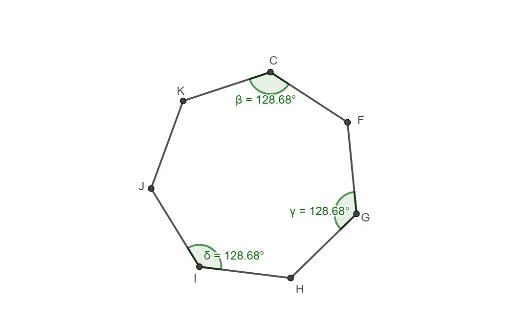
Circle(A, B) → cSegment(B, A) → fCircle(B, A) → dIntersect(c, d, 2) → CIntersect(c, d, 1) → DSegment(C, D) → gIntersect(f, g) → ECircle(C, E) → eIntersect(c, e, 2) → FCircle(F, C) → hIntersect(c, h, 2) → GCircle(G, F) → kIntersect(c, k, 2) → HCircle(H, G) → pIntersect(c, p, 2) → ICircle(I, H) → qIntersect(c, q, 2) → JCircle(J, I) → rIntersect(c, e, 1) → KCircle(K, J) → sSegment(C, F) → iSegment(F, G) → jSegment(G, H) → lSegment(H, I) → mSegment(I, J) → nSegment(J, K) → tSegment(K, C) → aAngle(I, J, K) → αAngle(K, C, F) → βAngle(F, G, H) → γAngle(H, I, J) → δ
AI Drawing Prompt Reference
Draw a circle, then draw a series of intersecting circles and segments to form a hexagon. Start by drawing a circle, then draw a point on this circle, and use this point as the center to draw another circle, which intersects the first circle at two points. Connect these two points with a segment, then use these two points as centers to draw circles that intersect the first circle at new points, repeating this process until a hexagon is formed. Finally, draw the sides of the hexagon and label the degree of one of its angles.
The prompt above was compiled from the original drawing commands and is for reference only.