
Axis of Symmetry
Loading the math board and drawing, please wait…
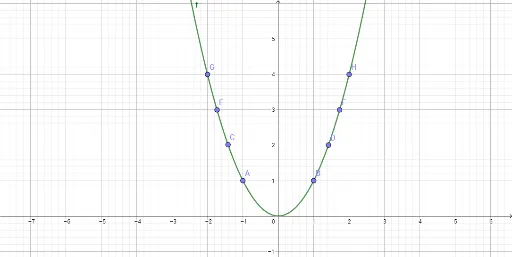
This example demonstrates the concept of axis of symmetry. It involves key mathematical concepts such as symmetry of functions. Using GeoGebra commands like Point and Distance, the axis of symmetry of a function can be constructed. Suitable for high school mathematics education, particularly for learning about symmetry in coordinate geometry and functions.
GeoGebra Commands & Parameters
Point(f) → APoint(f) → BPoint(f) → CPoint(f) → DPoint(f) → GPoint(f) → HDistance(A, B) → distanceABDistance(G, H) → distanceGHDistance(E, F) → distanceEFDistance(G, H) → aDistance(C, D) → distanceCD
AI Drawing Prompt Reference
Draw a function graph and find its axis of symmetry. First, select two symmetric points A and B on the function and calculate the distance between them as distanceAB. Then, select two more symmetric points G and H and calculate the distance between them as distanceGH, which will help us find the axis of symmetry. Next, select points C and D and calculate the distance between them as distanceCD. Finally, by calculating the distance a between G and H, we can determine the position of the axis of symmetry.
The prompt above was compiled from the original drawing commands and is for reference only.