
ASA Triangle Construction
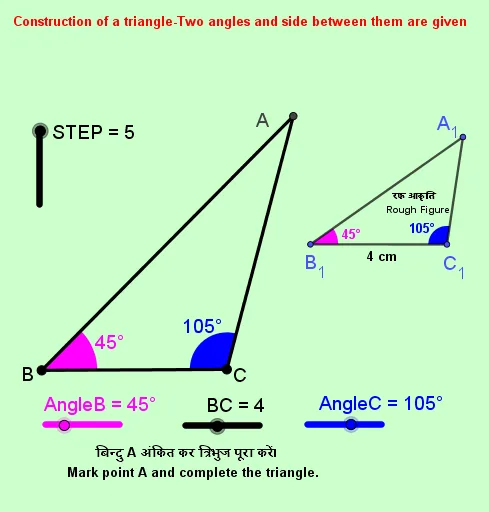
Loading the math board and drawing, please wait…
This GeoGebra example illustrates the construction of a triangle under the ASA (Angle-Side-Angle) condition, demonstrating how two angles and the included side uniquely determine a triangle. Key mathematical concepts include triangle congruence, angle measurement, and geometric construction principles. The construction employs GeoGebra commands such as Point, Segment, Rotate, Angle, Ray, and Intersect to locate vertices through angle rotation and intersection points. It is designed for middle and high school geometry students and teachers, reinforcing dynamic geometry skills and the theoretical uniqueness of ASA triangle construction.
GeoGebra Commands & Parameters
Point(Circle[B, BC]) → CSegment(B, C) → fRotate(C, AngleB, B) → C'Angle(C, B, C') → γRotate(B, (-AngleC), C) → B'Angle(B', C, B) → δRay(B, C') → gRay(C, B') → hIntersect(g, h) → APoint(g) → XPoint(h) → YSegment(A, C) → iSegment(A, B) → jSegment(B_1, C_1) → kSegment(A_1, B_1) → lSegment(A_1, C_1) → mAngle(C_1, B_1, A_1) → εAngle(A_1, C_1, B_1) → ζ
AI Drawing Prompt Reference
Draw a triangle given one side and two adjacent angles. Start with the base segment. At one endpoint, rotate the base by the first given angle to create a ray. At the other endpoint, rotate the base in the opposite direction by the second angle to create another ray. The intersection of these two rays is the third vertex. Connect this vertex to both endpoints to complete the triangle. Mark the two given angles at the base endpoints and show the rotated construction lines.
The prompt above was compiled from the original drawing commands and is for reference only.