
Areas of Parallelogram, Triangle, and Trapezium
Loading the math board and drawing, please wait…
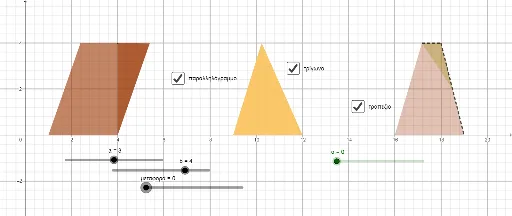
This example demonstrates how to calculate the areas of a parallelogram, triangle, and trapezium using geometric construction methods. Key mathematical concepts include similarity transformations, trigonometry, and vectors. Using GeoGebra commands such as point, line segment, rotation, mirror, and translation, the properties of these geometric shapes are visually illustrated. Suitable for middle and high school students studying geometry and trigonometry.
GeoGebra Commands & Parameters
Point(xAxis) → APoint(Circle[A, a]) → BSegment(A, B) → fPoint(f) → CPoint(Circle[C, b]) → DSegment(C, D) → gRotate(D, 90°, C) → D'Segment(A, D') → hLine(B, h) → iLine(D', f) → jIntersect(i, j) → EOrthogonalLine(B, xAxis) → kOrthogonalLine(D', k) → lIntersect(k, l) → FSegment(B, F) → mSegment(C, D') → nPolygon(A, D', F, B) → q1, a_1, d', f_1, b_1Polygon(F, E, B) → t1, b_2, f_2, eOrthogonalLine(A, d') → pLine(E, D') → qIntersect(p, q) → GPoint(Circle[F, μεταφορά]) → ΑSegment(F, Α) → rMirror(Α, F) → Α'Vector(F, Α') → uTranslate(F, u) → F'Translate(E, u) → E'Translate(B, u) → B'Polygon(F', E', B') → t1', b', f', e'Point(xAxis) → ΒPoint(Circle[Β, a]) → ΓSegment(Β, Γ) → sPoint(s) → ΔPoint(Circle[Δ, b]) → ΕSegment(Δ, Ε) → tRotate(Ε, 90°, Δ) → Ε'Polygon(Β, Ε', Γ) → t2, γ, β, ε'Segment(Ε', Δ) → cMidpoint(β) → ΖRotate(Β, α, Ζ) → Β'Rotate(Ε', α, Ζ) → Ε''Rotate(Γ, α, Ζ) → Γ'Polygon(Β', Ε'', Γ') → t2', γ', β', ε''Point(xAxis) → ΗPoint(Circle[Η, a]) → ΘSegment(Η, Θ) → dPoint(d) → ΙPoint(Circle[Ι, b]) → ΚSegment(Ι, Κ) → g_1Rotate(Κ, 90°, Ι) → Κ'Segment(Ι, Κ') → h_1OrthogonalLine(Κ', h_1) → i_1Point(i_1) → ΛSegment(Η, Κ') → j_1Segment(Κ', Λ) → k_1Segment(Λ, Θ) → l_1Segment(Θ, Η) → m_1Midpoint(l_1) → ΜPolygon(Η, Κ', Μ, Θ) → q2, η, κ', μ, θPolygon(Κ', Λ, Μ) → t3, μ_1, n_1, λRotate(Κ', α, Μ) → Κ''Rotate(Λ, α, Μ) → Λ'Rotate(Μ, α, Μ) → Μ'Polygon(Κ'', Λ', Μ') → t3', μ', κ'', λ'