
Area of Triangles - An Activity
Loading the math board and drawing, please wait…
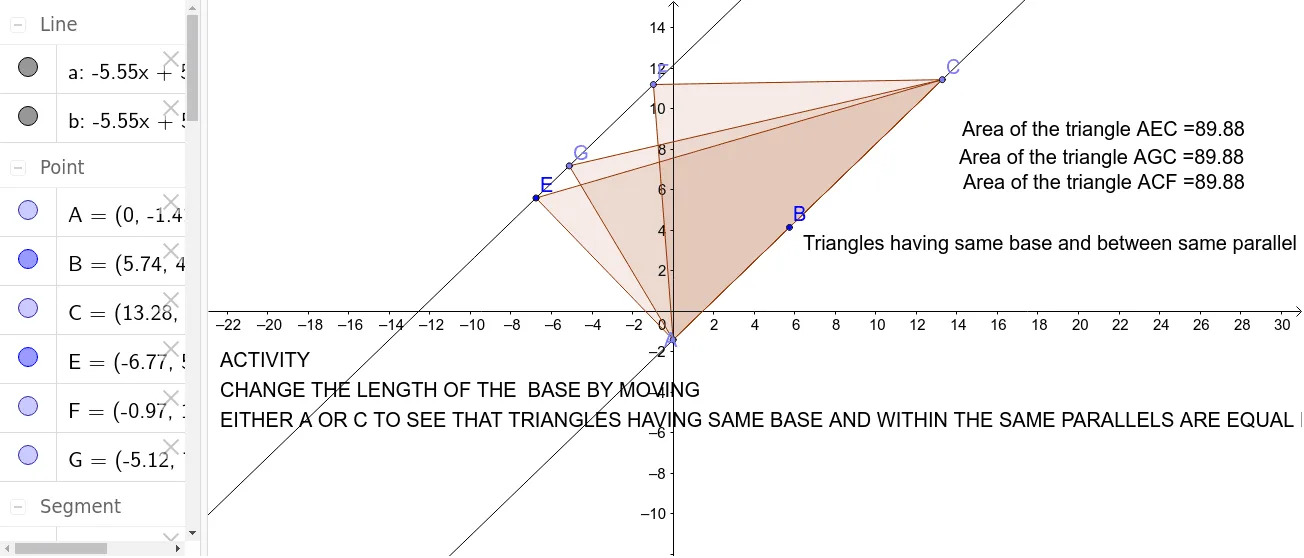
This example demonstrates the calculation of triangle area through an interactive activity, focusing on the case where triangles lie between two parallel lines, showing that their area is constant for a given base length. Core math concepts include triangle area formulas, properties of parallel lines, and geometric constructions. It uses GeoGebra commands like Point, Line, and Polygon. Suitable for middle school and above students to learn and understand triangle area formulas and their applications.
GeoGebra Commands & Parameters
Point(yAxis) → ALine(A, B) → aPoint(a) → CLine(E, a) → bPolygon(E, A, C) → poly1, c, e, a_1Point(b) → FPolygon(A, F, C) → poly2, c_1, a_2, fPoint(b) → GPolygon(G, A, C) → poly3, c_2, g, a_3
AI Drawing Prompt Reference
Draw two parallel lines, take a point on one line, connect it to one endpoint of the other line to form a triangle. Move the point along the line to construct more triangles, showing that their areas remain equal. Use a slider to control the base length of the triangles and verify the relationship between area and base length.
The prompt above was compiled from the original drawing commands and is for reference only.