
Area of Trapezoid: Dynamic Geometric Construction
Loading the math board and drawing, please wait…
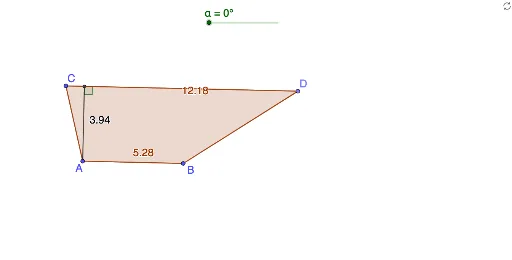
This GeoGebra example dynamically demonstrates the derivation of the trapezoid area formula through interactive geometric construction. It visually shows how the area of a trapezoid (half the sum of the parallel sides times the height) can be verified by transforming the shape into a parallelogram or rectangle using rotations and midpoints. The construction employs core GeoGebra commands including Segment, Line, Point, Polygon, Midpoint, Rotate, Distance, OrthogonalLine, Intersect, and Angle, creating objects such as trapezoid ABCD, auxiliary lines, rotated copies (A', B', C', D'), and measurement points (E, F) with associated segments and angles. The interactive sliders allow users to adjust dimensions and observe how the area changes in real time. This resource is ideal for middle and high school mathematics classrooms, supporting conceptual understanding of area formulas, geometric transformations, and dynamic exploration. It also serves as a practical example for learning GeoGebra construction techniques.
GeoGebra Commands & Parameters
Segment(A, B) → fLine(C, f) → gPoint(g) → DPolygon(A, C, D, B) → q1, a, c, d, bMidpoint(d) → ERotate(A, (-α), E) → A'Rotate(C, (-α), E) → C'Rotate(D, (-α), E) → D'Rotate(B, (-α), E) → B'Polygon(A', C', D', B') → q1', a', c', d', b'Distance(c', b') → eOrthogonalLine(A, b) → hIntersect(h, c) → FSegment(A, F) → iAngle(A, F, D) → β