
Area of Shapes Using Polynomials (Basic)
Loading the math board and drawing, please wait…
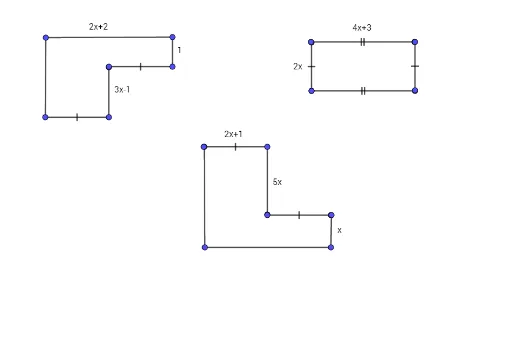
This example demonstrates calculating the area of shapes using polynomials. It shows the basic application of polynomial functions and how to construct and calculate the area using GeoGebra. Commands used include Point, Segment, Function, Integral, etc. Suitable for middle school and above students to learn basic geometry and calculus.
GeoGebra Commands & Parameters
Point(Circle[A, 2.9600675667964067]) → BSegment(A, G) → fSegment(A, B) → gSegment(B, H) → hSegment(H, I) → iPoint(Circle[A_2, 2.9600675667964067]) → B_1Segment(A_2, B_1) → g_1Segment(B_1, H_1) → h_1Segment(G, H_1) → jSegment(J, K) → kSegment(L, M) → lSegment(L_1, M_1) → l_1Segment(J_1, K_1) → k_1Segment(A_3, G_1) → f_1Point(Circle[A_4, 2.9600675667964067]) → B_2Segment(A_4, B_2) → g_2Segment(B_2, H_2) → h_2Segment(H_2, N) → mPoint(Circle[A_7, 2.9600675667964067]) → B_3Segment(A_7, B_3) → g_3Segment(B_3, H_3) → h_3Segment(H_4, N_1) → m_1Segment(G_1, N_1) → n
AI Drawing Prompt Reference
Draw a geometric figure with multiple points and line segments to demonstrate how to calculate area using polynomials. Start by drawing a circle and marking points on it, then connect these points to form several triangles and quadrilaterals. Next, draw integral symbols on these shapes to represent the process of calculating area. Finally, connect key points of these shapes with line segments to create a complex geometric structure, showcasing the application of polynomials in geometry.
The prompt above was compiled from the original drawing commands and is for reference only.