
Area of Rectangles and Squares: Tessellation with Unit Squares
Loading the math board and drawing, please wait…
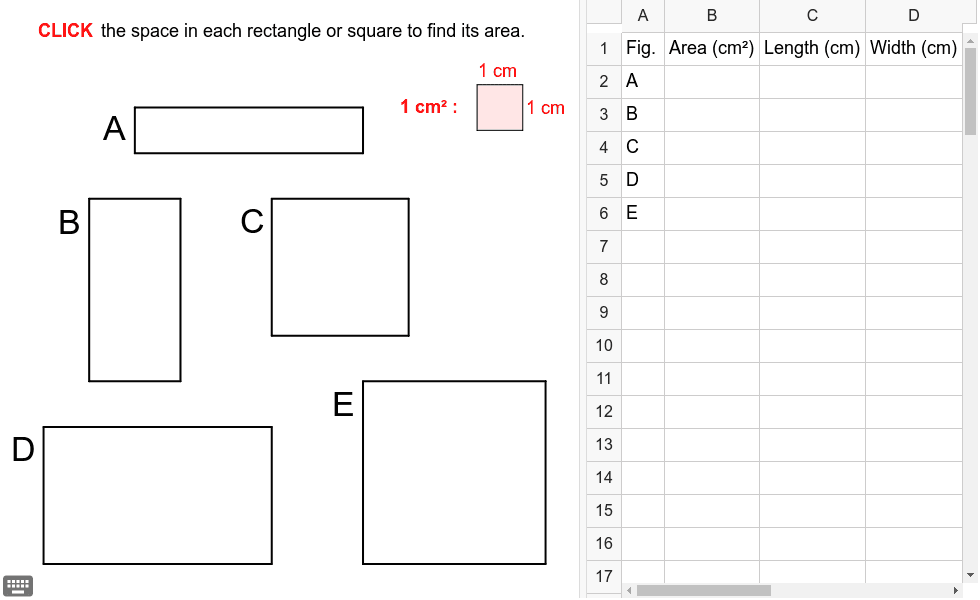
① This GeoGebra example demonstrates how the area of rectangles and squares can be explored by tessellating their interior with unit squares, making the area formula visually intuitive. ② The core mathematical concept is the definition of area as the number of unit squares covering a region, leading to the formulas area = length × width for rectangles and area = side² for squares. ③ Construction details: The applet uses the Polygon command to create multiple square objects (e.g., sqr_1 through sqr_8) and the Segment command to draw side lengths, arranging unit squares in a grid to show how the total count relates to dimensions. ④ This resource is suitable for upper elementary or middle school students learning geometric measurement, and serves as an effective visual aid for teachers introducing area formulas or for students conducting hands-on exploration of the relationship between side lengths and area.
GeoGebra Commands & Parameters
Polygon((2, 0), (3, 0), (3, 1), (2, 1)) → sqr_1, a_1, b_1, c_1, d_1Polygon((3, 0), (4, 0), (4, 1), (3, 1)) → sqr_2, a_2, b_2, c_2, d_2Polygon((4, 0), (5, 0), (5, 1), (4, 1)) → sqr_3, a_3, b_3, c_3, d_3Polygon((5, 0), (6, 0), (6, 1), (5, 1)) → sqr_4, a_4, b_4, c_4, d_4Polygon((6, 0), (7, 0), (7, 1), (6, 1)) → sqr_5, a_5, b_5, c_5, d_5Polygon((1, -2), (2, -2), (2, -1), (1, -1)) → sqr_6, a_6, b_6, c_6, d_6Polygon((2, -2), (3, -2), (3, -1), (2, -1)) → sqr_7, a_7, b_7, c_7, d_7Polygon((1, -3), (2, -3), (2, -2), (1, -2)) → sqr_8, a_8, b_8, c_8, d_8Polygon((2, -3), (3, -3), (3, -2), (2, -2)) → sqr_9, a_9, b_9, c_9, d_9Polygon((1, -4), (2, -4), (2, -3), (1, -3)) → sqr_{10}, a_{10}, b_{10}, c_{10}, d_{10}Polygon((2, -4), (3, -4), (3, -3), (2, -3)) → sqr_{11}, a_{11}, b_{11}, c_{11}, d_{11}Polygon((1, -5), (2, -5), (2, -4), (1, -4)) → sqr_{12}, a_{12}, b_{12}, c_{12}, d_{12}Polygon((2, -5), (3, -5), (3, -4), (2, -4)) → sqr_{13}, a_{13}, b_{13}, c_{13}, d_{13}Polygon((5, -2), (6, -2), (6, -1), (5, -1)) → sqr_{14}, a_{14}, b_{14}, c_{14}, d_{14}Polygon((6, -2), (7, -2), (7, -1), (6, -1)) → sqr_{15}, a_{15}, b_{15}, c_{15}, d_{15}Polygon((7, -2), (8, -2), (8, -1), (7, -1)) → sqr_{16}, a_{16}, b_{16}, c_{16}, d_{16}Polygon((5, -3), (6, -3), (6, -2), (5, -2)) → sqr_{17}, a_{17}, b_{17}, c_{17}, d_{17}Polygon((6, -3), (7, -3), (7, -2), (6, -2)) → sqr_{18}, a_{18}, b_{18}, c_{18}, d_{18}Polygon((7, -3), (8, -3), (8, -2), (7, -2)) → sqr_{19}, a_{19}, b_{19}, c_{19}, d_{19}Polygon((5, -4), (6, -4), (6, -3), (5, -3)) → sqr_{20}, a_{20}, b_{20}, c_{20}, d_{20}Polygon((6, -4), (7, -4), (7, -3), (6, -3)) → sqr_{21}, a_{21}, b_{21}, c_{21}, d_{21}Polygon((7, -4), (8, -4), (8, -3), (7, -3)) → sqr_{22}, a_{22}, b_{22}, c_{22}, d_{22}Polygon((0, -7), (1, -7), (1, -6), (0, -6)) → sqr_{23}, a_{23}, b_{23}, c_{23}, d_{23}Polygon((1, -7), (2, -7), (2, -6), (1, -6)) → sqr_{24}, a_{24}, b_{24}, c_{24}, d_{24}Polygon((2, -7), (3, -7), (3, -6), (2, -6)) → sqr_{25}, a_{25}, b_{25}, c_{25}, d_{25}Polygon((3, -7), (4, -7), (4, -6), (3, -6)) → sqr_{26}, a_{26}, b_{26}, c_{26}, d_{26}Polygon((4, -7), (5, -7), (5, -6), (4, -6)) → sqr_{27}, a_{27}, b_{27}, c_{27}, d_{27}Polygon((0, -8), (1, -8), (1, -7), (0, -7)) → sqr_{28}, a_{28}, b_{28}, c_{28}, d_{28}Polygon((1, -8), (2, -8), (2, -7), (1, -7)) → sqr_{29}, a_{29}, b_{29}, c_{29}, d_{29}Polygon((2, -8), (3, -8), (3, -7), (2, -7)) → sqr_{30}, a_{30}, b_{30}, c_{30}, d_{30}Polygon((3, -8), (4, -8), (4, -7), (3, -7)) → sqr_{31}, a_{31}, b_{31}, c_{31}, d_{31}Polygon((4, -8), (5, -8), (5, -7), (4, -7)) → sqr_{32}, a_{32}, b_{32}, c_{32}, d_{32}Polygon((0, -9), (1, -9), (1, -8), (0, -8)) → sqr_{33}, a_{33}, b_{33}, c_{33}, d_{33}Polygon((1, -9), (2, -9), (2, -8), (1, -8)) → sqr_{34}, a_{34}, b_{34}, c_{34}, d_{34}Polygon((2, -9), (3, -9), (3, -8), (2, -8)) → sqr_{35}, a_{35}, b_{35}, c_{35}, d_{35}Polygon((3, -9), (4, -9), (4, -8), (3, -8)) → sqr_{36}, a_{36}, b_{36}, c_{36}, d_{36}Polygon((4, -9), (5, -9), (5, -8), (4, -8)) → sqr_{37}, a_{37}, b_{37}, c_{37}, d_{37}Polygon((7, -6), (8, -6), (8, -5), (7, -5)) → sqr_{38}, a_{38}, b_{38}, c_{38}, d_{38}Polygon((8, -6), (9, -6), (9, -5), (8, -5)) → sqr_{39}, a_{39}, b_{39}, c_{39}, d_{39}Polygon((9, -6), (10, -6), (10, -5), (9, -5)) → sqr_{40}, a_{40}, b_{40}, c_{40}, d_{40}Polygon((10, -6), (11, -6), (11, -5), (10, -5)) → sqr_{41}, a_{41}, b_{41}, c_{41}, d_{41}Polygon((7, -7), (8, -7), (8, -6), (7, -6)) → sqr_{42}, a_{42}, b_{42}, c_{42}, d_{42}Polygon((8, -7), (9, -7), (9, -6), (8, -6)) → sqr_{43}, a_{43}, b_{43}, c_{43}, d_{43}Polygon((9, -7), (10, -7), (10, -6), (9, -6)) → sqr_{44}, a_{44}, b_{44}, c_{44}, d_{44}Polygon((10, -7), (11, -7), (11, -6), (10, -6)) → sqr_{45}, a_{45}, b_{45}, c_{45}, d_{45}Polygon((7, -8), (8, -8), (8, -7), (7, -7)) → sqr_{46}, a_{46}, b_{46}, c_{46}, d_{46}Polygon((8, -8), (9, -8), (9, -7), (8, -7)) → sqr_{47}, a_{47}, b_{47}, c_{47}, d_{47}Polygon((9, -8), (10, -8), (10, -7), (9, -7)) → sqr_{48}, a_{48}, b_{48}, c_{48}, d_{48}Polygon((10, -9), (11, -9), (11, -8), (10, -8)) → sqr_{49}, a_{49}, b_{49}, c_{49}, d_{49}Polygon((7, -9), (8, -9), (8, -8), (7, -8)) → sqr_{50}, a_{50}, b_{50}, c_{50}, d_{50}Polygon((8, -9), (9, -9), (9, -8), (8, -8)) → sqr_{51}, a_{51}, b_{51}, c_{51}, d_{51}Polygon((9, -9), (10, -9), (10, -8), (9, -8)) → sqr_{52}, a_{52}, b_{52}, c_{52}, d_{52}Polygon((10, -8), (11, -8), (11, -7), (10, -7)) → sqr_{53}, a_{53}, b_{53}, c_{53}, d_{53}Polygon((9.5, 0.5), (10.5, 0.5), (10.5, 1.5), (9.5, 1.5)) → poly6, f_1, g_1, h_1, i_1Segment((2, 0), (7, 0)) → aSegment((2, 0), (2, 1)) → bSegment((2, 1), (7, 1)) → cSegment((7, 0), (7, 1)) → dSegment((1, -1), (3, -1)) → eSegment((1, -1), (1, -5)) → fSegment((3, -5), (3, -1)) → gSegment((3, -5), (1, -5)) → hSegment((5, -4), (5, -1)) → iSegment((0, -6), (0, -9)) → mSegment((5, -9), (0, -9)) → nSegment((5, -9), (5, -6)) → pSegment((0, -6), (5, -6)) → qSegment((7, -5), (11, -5)) → rSegment((7, -5), (7, -9)) → sSegment((11, -9), (7, -9)) → tSegment((11, -9), (11, -5)) → e_1Segment((5, -1), (8, -1)) → kSegment((8, -4), (8, -1)) → lSegment((5, -4), (8, -4)) → j
AI Drawing Prompt Reference
Draw a large rectangle composed of multiple small squares arranged tightly to illustrate how unit squares can fill the interior of a rectangle, demonstrating the concept of area. Start from the top-left corner, draw a row of 5 small squares, then 4 more rows, each extending to the right and downward, forming a larger rectangle. Each small square is clearly visible with distinct edges, visually demonstrating the area formulas for rectangles (length × width) and squares (side²).
The prompt above was compiled from the original drawing commands and is for reference only.