
Area of Parallelogram Defined by Vectors
Loading the math board and drawing, please wait…
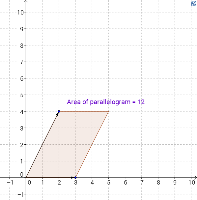
This applet demonstrates the area of a parallelogram defined by two vectors. Key mathematical concepts include vectors and coordinate geometry. Using GeoGebra commands such as Vector, Translate, and Polygon, the applet visually illustrates vector addition and the calculation of the parallelogram's area. Suitable for high school mathematics education and learning.
GeoGebra Commands & Parameters
Intersect(xAxis, yAxis) → AVector(A, B) → uVector(A, C) → vTranslate(C, u) → C'Vector(C, C') → wPolygon(A, C, C', B) → poly1, a, c, c', b
AI Drawing Prompt Reference
Draw a parallelogram defined by two vectors on a coordinate plane. Start with a common origin point, then draw two distinct vectors from this origin as adjacent sides of the parallelogram. Next, translate the endpoint of one vector by the other vector to find the fourth vertex. Finally, connect the origin, the endpoint of the first vector, the translated vertex, and the endpoint of the second vector to form a closed parallelogram. Clearly show the two original vectors, the translation vector, and the parallelogram's boundary, with all vertices labeled.
The prompt above was compiled from the original drawing commands and is for reference only.