
Area of Equal Composition Figures
Loading the math board and drawing, please wait…
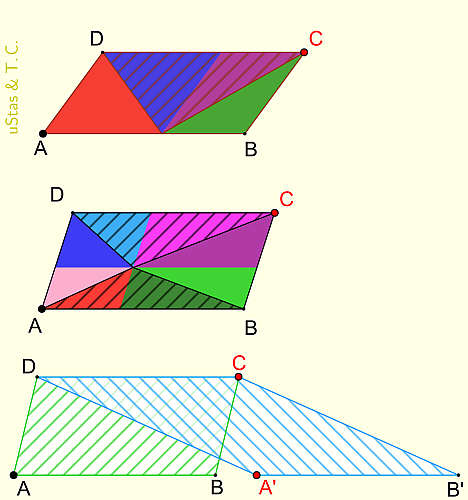
This example demonstrates three problems on the area of equal composition figures. Key mathematical concepts include geometric construction, transformation, and coordinate geometry. Using GeoGebra commands such as RotateText, Point, Translate, Segment, and Polygon, students can visually understand the properties of equal composition figures. Suitable for middle school and above students.
GeoGebra Commands & Parameters
RotateText("uStas\;\&\;Т.С.", 90*°) → надпись01Point(Arc[Circle[B, 0.5], 0, 3]) → CPoint(Segment[A, B]) → MTranslate(M, Vector[B, C]) → NSegment(M, N) → ePolygon(A, M, D) → s1, d, a, mPolygon(N, D, M) → s2, m_1, n, d_1Polygon(M, B, C) → s3, b, f, gPolygon(C, N, M) → s4, c, h, iPolygon(A, B, C, D) → s5, a_4, b_5, c_5, d_6Polygon(C, M, D) → s6, d_7, c_6, m_{10}Point(Arc[Circle[B_2, 0.5], 0, 3]) → C_2Polygon(A_2, B_2, C_2, D_2) → s7, a_2, b_2, c_2, d_2Polygon(A_2 + (0.01, 0.01), B_2 + (-0.01, 0.01), C_2 + (-0.01, -0.01), D_2 + (0.01, -0.01)) → s8, l, p, q, rPointIn(s8) → M_2Line(M_2, Line[A_2, D_2]) → jIntersect(j, a_2) → N_1Intersect(j, c_2) → N_2Segment(N_1, N_2) → h_1Line(M_2, Line[A_2, B_2]) → kIntersect(d_2, k) → L_1Intersect(k, b_2) → L_2Segment(L_1, L_2) → i_1Polygon(A_2, N_1, M_2) → t1, s, t, a_1Polygon(M_2, L_1, A_2) → t2, e_1, f_1, g_1Polygon(B_2, M_2, N_1) → t3, n_6, b_1, m_3Polygon(M_2, B_2, L_2) → t4, l_3, m_4, b_3Polygon(C_2, M_2, L_2) → t5, l_4, c_1, m_5Polygon(M_2, C_2, N_2) → t6, n_4, m_6, c_3Polygon(D_2, L_1, M_2) → t7, m_7, d_3, l_5Polygon(M_2, N_2, D_2) → t8, d_4, m_8, n_5Polygon(A_2, B_2, M_2) → t9, m_2, a_3, b_4Polygon(C_2, M_2, D_2) → t91, d_5, c_4, m_9Point(Arc[Circle[B_3, 0.5], 0, 3]) → C_3Point(Ray[Translate[A_3, Vector[0.9 * Vector[B_3, A_3]]], B_3]) → A'Translate(A', Vector[A_3, B_3]) → B'Polygon(A_3, B_3, C_3, D_3) → p1, a_5, b_6, c_7, d_8Polygon(A', B', C_3, D_3) → p2, a', b', c_8, d_9Polygon(A_3, A', D_3) → p3, d_{10}, a_6, a'_1Polygon(B_3, B', C_3) → p4, c_9, b_7, b'_1Polygon(A_3, B', C_3, D_3) → p5, a_7, b'_2, c_{10}, d_{11}
AI Drawing Prompt Reference
Draw a complex geometric figure with multiple polygons and points, demonstrating equal area compositions. Include a central rotating text label and four main polygons interconnected by points and line segments, forming intricate relationships. Start with the central text and basic polygon framework, then add connecting points and lines, and finally fill the polygons to highlight the equal area constructions.
The prompt above was compiled from the original drawing commands and is for reference only.