
Area of an Equilateral Triangle: Dynamic GeoGebra Construction
Loading the math board and drawing, please wait…
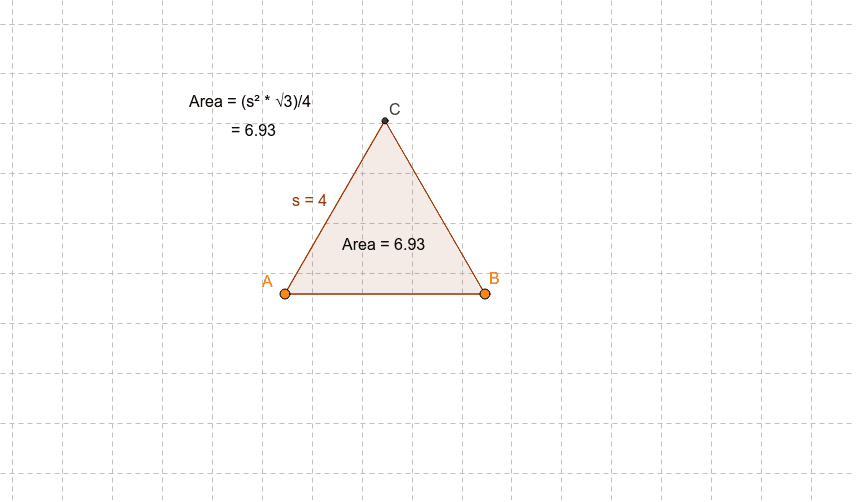
This GeoGebra example demonstrates the dynamic construction of an equilateral triangle and the calculation of its area as the side length changes. Core mathematical concepts include the properties of equilateral triangles, the triangle area formula, the quadratic relationship between side length and area, and plane figure perimeter and area calculations. The construction uses the GeoGebra command Polygon to create the polygon object poly1 from points A and B, with auxiliary objects a, b₁, s, C and text labels Textpoly1, text1, text2 to display side length, area, and related measurements. It is suitable for middle school plane geometry instruction and high school exploration activities connecting geometry and algebra, ideal for classroom demonstrations and student inquiry.
GeoGebra Commands & Parameters
Polygon(A, B, 3) → poly1, a, b_1, s, C
AI Drawing Prompt Reference
Draw an equilateral triangle whose side length can be changed dynamically; start with a base segment, construct the equilateral triangle on it, and automatically display the side length, area, and perimeter as live measurements that update instantly when the base length varies, using distinct colors for each label to highlight the geometric‑algebraic relationship. The construction should show the triangle, the three equal sides, and the numeric readouts side by side, allowing students to observe the quadratic growth of area with side length.
The prompt above was compiled from the original drawing commands and is for reference only.