
Area of a Circle by sudheer kumar kotha
Loading the math board and drawing, please wait…
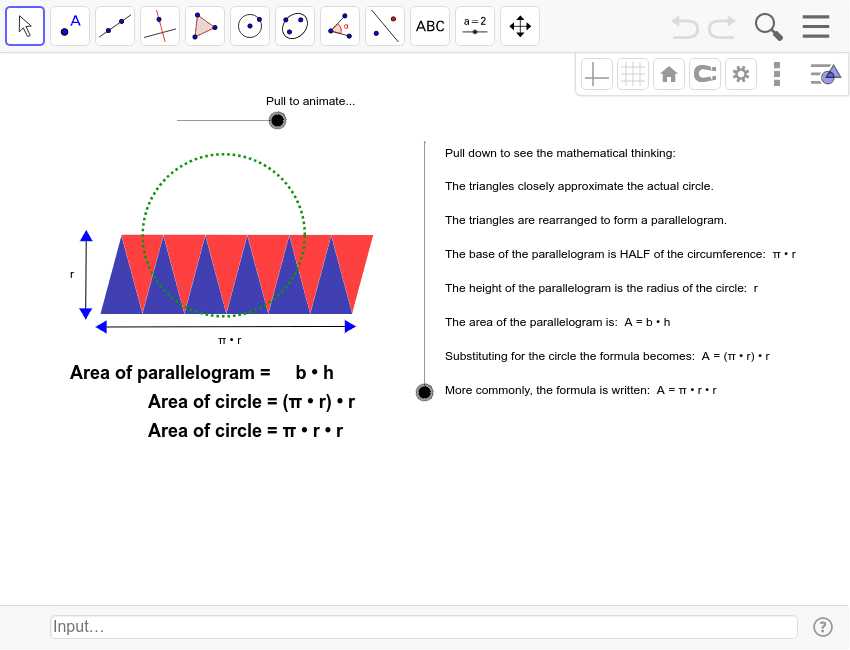
This example demonstrates the dynamic calculation of a circle's area. It involves core concepts like the circle, area formula, and geometric transformations. GeoGebra commands and objects used include Circle, Point, Vector, Translate, Rotate, Line, Angle, Mirror, Polygon, OrthogonalLine, Segment. Suitable for high school mathematics teaching to understand and derive the area formula of a circle.
GeoGebra Commands & Parameters
Circle(A, a) → cPoint(c) → BVector(B, A) → uTranslate(C, Vector[(-u)]) → C'_2Rotate(C'_2, ((g / 100 * 15))°, C'_2) → C''_2Line(B, A) → bRotate(B, 30*°, A) → B'Angle(B, A, B') → αLine(B', A) → dCircle(C, a) → eVector(A, B') → vVector(B, B') → wTranslate(C, v) → C'_1Rotate(C'_2, 60*°, C) → C''_1Rotate(C'_1, 60*°, C) → DLine(C'_2, C) → fMirror(C'_1, f) → EMirror(C''_1, f) → C'''Mirror(D, f) → D'Polygon(E, C'_2, C) → poly1, c_1, e_1, c'Rotate(E, ((g / 100 * 15))°, C'_2) → E'_1Rotate(C, ((g / 100 * 15))°, C'_2) → C'_3Polygon(E'_1, C''_2, C'_3) → poly1', c'_1, e', c''Polygon(C''', E, C) → poly2, c_2, c''', e_2Rotate(C''', (g / 100 * β), F) → GRotate(E, (g / 100 * β), F) → E'Rotate(C, (g / 100 * β), F) → C'_4Polygon(G, E', C'_4) → poly2', c'_2, g_1, e'_1Polygon(C, D', C''') → poly3, c'''_1, c_3, d'Rotate(C, (g / 100 * γ), H) → C'Rotate(D', (g / 100 * γ), H) → D''Rotate(C''', (g / 100 * γ), H) → IPolygon(C', D'', I) → poly3', i, c'_3, d''Mirror(C', f) → C''_3Mirror(D'', f) → D'''_1Mirror(I, f) → I'_1Polygon(C''_3, D'''_1, I'_1) → poly3''_1, i', c''_1, d'''Mirror(G, f) → G'_1Mirror(E', f) → E''_1Mirror(C'_4, f) → JPolygon(G'_1, E''_1, J) → poly2''_1, j, g', e''Mirror(E'_1, f) → KMirror(C''_2, f) → LMirror(C'_3, f) → MPolygon(K, L, M) → poly1''_1, m, k, lOrthogonalLine(C, f) → hMirror(C', h) → C''Mirror(D'', h) → D'''Mirror(I, h) → I'Polygon(C'', D''', I') → poly3'', i'_1, c''_2, d'''_1Mirror(G, h) → G'Mirror(E', h) → E''Mirror(C'_4, h) → NPolygon(G', E'', N) → poly2'', n, g'_1, e''_1Mirror(E'_1, h) → OMirror(C''_2, h) → PMirror(C'_3, h) → QPolygon(O, P, Q) → poly1'', q, o, pMirror(K, h) → K'Mirror(L, h) → L'Mirror(M, h) → M'Polygon(K', L', M') → poly4, m', k', l'Mirror(G'_1, h) → RMirror(E''_1, h) → SMirror(J, h) → J'Polygon(R, S, J') → poly5, j', r, sMirror(C''_3, h) → TMirror(D'''_1, h) → UMirror(I'_1, h) → VPolygon(T, U, V) → poly6, v_1, t, u_1Vector((0, 0), (-3.27, 2.09)) → offsetvectorPoint(c) → WRotate(W, 30*°, A) → W'Angle(W, A, W') → δVector(W', W) → zVector(W', A) → w_1Polygon(TestPoint, E_1, D_1, J_1, TestB, Z, F_1, A_1, G_1, B_1, H_1, C_1, I_1) → poly7, testpoint, i_1, d_1, j_1, testb, e_3, z_1, f_1, a_1, g_2, b_1, h_1, c_4Translate(TestPoint, Vector[((g - 100) / 100 * w_1)]) → TestPoint'_1Translate(E_1, Vector[((g - 100) / 100 * w_1)]) → K_1Translate(Z, Vector[((g - 100) / 100 * w_1)]) → Z'_1Translate(F_1, Vector[((g - 100) / 100 * w_1)]) → L_1Translate(A_1, Vector[((g - 100) / 100 * w_1)]) → M_1Translate(G_1, Vector[((g - 100) / 100 * w_1)]) → N_1Translate(B_1, Vector[((g - 100) / 100 * w_1)]) → O_1Translate(H_1, Vector[((g - 100) / 100 * w_1)]) → P_1Translate(C_1, Vector[((g - 100) / 100 * w_1)]) → Q_1Translate(I_1, Vector[((g - 100) / 100 * w_1)]) → R_1Translate(D_1, Vector[((g - 100) / 100 * w_1)]) → S_1Translate(J_1, Vector[((g - 100) / 100 * w_1)]) → T_1Translate(TestB, Vector[((g - 100) / 100 * w_1)]) → TestB'_1Polygon(TestPoint'_1, K_1, S_1, T_1, TestB'_1, Z'_1, L_1, M_1, N_1, O_1, P_1, Q_1, R_1) → poly7'_1, testpoint', r_1, s_1, t_1, testb', k_1, z', l_1, m_1, n_1, o_1, p_1, q_1Mirror(TestPoint, h) → TestPoint'Mirror(E_1, h) → U_1Mirror(Z, h) → Z'Mirror(F_1, h) → V_1Mirror(A_1, h) → W_1Mirror(G_1, h) → Z_1Mirror(B_1, h) → A_2Mirror(H_1, h) → B_2Mirror(C_1, h) → C_2Mirror(I_1, h) → D_2Mirror(D_1, h) → E_2Mirror(J_1, h) → F_2Mirror(TestB, h) → TestB'Polygon(TestPoint', U_1, E_2, F_2, TestB', Z', V_1, W_1, Z_1, A_2, B_2, C_2, D_2) → poly7', testpoint'_1, d_2, e_4, f_2, testb'_1, u_2, z'_1, v_2, w_2, z_2, a_2, b_2, c_5Segment(G_2, H_2) → h_2Segment(I_2, J_2) → i_2
AI Drawing Prompt Reference
Draw a circle and demonstrate the dynamic calculation of its area. Start with a radius from the center, then construct multiple auxiliary lines and rotated shapes based on the radius and angles. Use geometric transformations like translation, rotation, and reflection to generate several polygons that combine to approximate the circle's area. The process should be dynamic, highlighting core concepts of the circle, area formula, and geometric transformations.
The prompt above was compiled from the original drawing commands and is for reference only.