
Area of a Circle by Muru_Raj_10
Loading the math board and drawing, please wait…
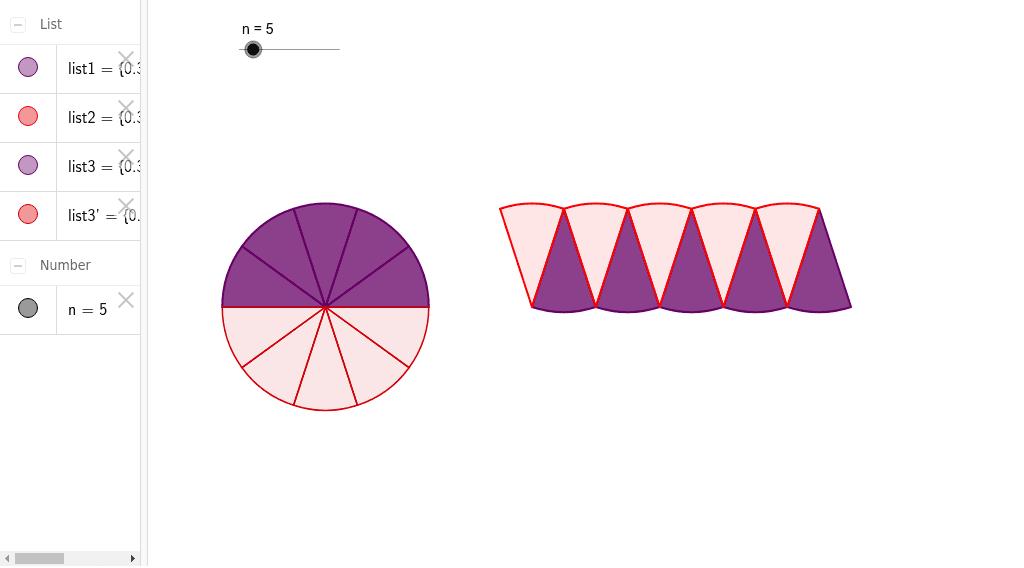
This example demonstrates how to calculate the area of a circle using geometric construction. Key mathematical concepts include the properties of circles and the area formula. It utilizes the Sequence and Mirror commands. Suitable for middle school and above students learning geometry and area calculation.
GeoGebra Commands & Parameters
Sequence(CircleSector[((2 * k - 1) * sin(π / (2 * n)), cos(π / (2 * n))), ((2 * k - 2) * sin(π / (2 * n)), 0), (2 * k * sin(π / (2 * n)), 0)], k, 1, n) → list1Sequence(CircleSector[((2 * k - 2) * sin(π / (2 * n)), 0), ((2 * k - 1) * sin(π / (2 * n)), cos(π / (2 * n))), ((2 * k - 3) * sin(π / (2 * n)), cos(π / (2 * n)))], k, 1, n) → list2Sequence(CircleSector[(-2, 0), (-2 + cos((k - 1) * π / n), sin((k - 1) * π / n)), (-2 + cos(k * π / n), sin(k * π / n))], k, 1, n) → list3Mirror(list3, xAxis) → list3'
AI Drawing Prompt Reference
Draw a circle and construct its area using a sequence of circular sectors. First, draw multiple circular sectors starting from the center, forming part of the circle. Then, draw more sectors from the edge in reverse order, again forming part of the circle. Finally, draw a series of circular sectors from the center to cover the entire circle, and use the mirror command to reflect these sectors below the x-axis to complete the circle.
The prompt above was compiled from the original drawing commands and is for reference only.