
Apple Surface Construction Demo
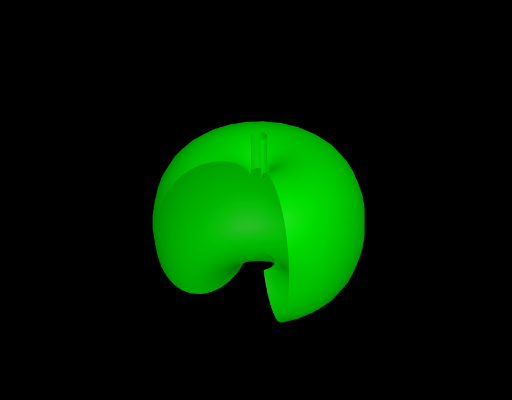
Loading the math board and drawing, please wait…
This example demonstrates how to construct an apple-shaped surface using GeoGebra, involving core math concepts like surface, means, curve sketching, ratios, definite integral, and logarithm. Key GeoGebra commands and objects used include Surface, a, b, c, Umax, Vmin, Vmax, s, suitable for high school and above students learning complex surface constructions in calculus and geometry.
GeoGebra Commands & Parameters
Surface((cos(u) * (b + (a * cos(v)))), (sin(u) * (b + (a * cos(v)))), (((cos(v) + sin(v) - 1) * (1 + sin(v))) * log(1 - (π * v / 10))) + (c * sin(v)), u, 0, Umax, v, Vmin, Vmax) → s
AI Drawing Prompt Reference
Draw an apple-shaped surface. The surface has a core and several rings. The core is at the center, surrounded by rings. The radius and height of the rings vary based on parameters. The shape resembles slices of an apple. Construct by first placing the core, then adding rings, and finally adjusting parameters to form the complete apple shape.
The prompt above was compiled from the original drawing commands and is for reference only.