
Animating the Parabola: Rotation, Vectors, and Optimization
Loading the math board and drawing, please wait…
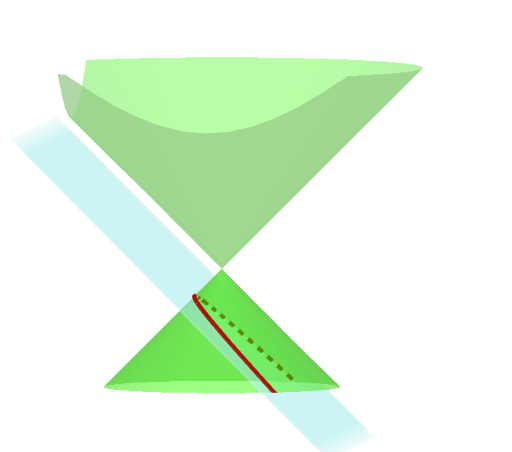
This GeoGebra example animates a parabola dynamically, illustrating its rotation, vector representation, and geometric aspects of optimization problems. Core mathematical concepts include parabola equations, parametric curves, vector operations, rotational transformations, and optimization (e.g., extrema) interpreted geometrically. Construction highlights: the Plane command defines a reference plane, CurveCartesian draws the parametric curve, and multiple points (A, B, C, etc.) and segments (d, a, b, etc.) serve as auxiliary elements. Sliders or animation controls vary parameters to adjust the parabola's shape and position in real time. Suitable for high school and early college students studying analytic geometry, function graphing, vectors, and transformations, as well as for teachers demonstrating dynamic geometry in classrooms.
GeoGebra Commands & Parameters
Plane(A, B, C) → cPlane(F, E, D) → fPlane(I, G, H) → eCurveCartesian(sqrt(t^(2) - (d - t)^(2)), d - t, t, t, -20, 20) → iCurveCartesian((-sqrt(t^(2) - (d - t)^(2))), d - t, t, t, -20, 20) → j
AI Drawing Prompt Reference
Create a dynamic parabola with an upward-opening main curve and a symmetric downward curve, both defined by parametric equations, forming a closed loop. Include three reference planes determined by distinct sets of points to illustrate spatial rotation and projection. The parabola's shape and position are adjustable via sliders, with auxiliary points and segments marking vector directions and optimization extrema. Present a 3D perspective emphasizing curve rotation, vector decomposition, and geometric optimization for educational demonstration.
The prompt above was compiled from the original drawing commands and is for reference only.