
Animated Demonstration of the Pythagorean Theorem
Loading the math board and drawing, please wait…
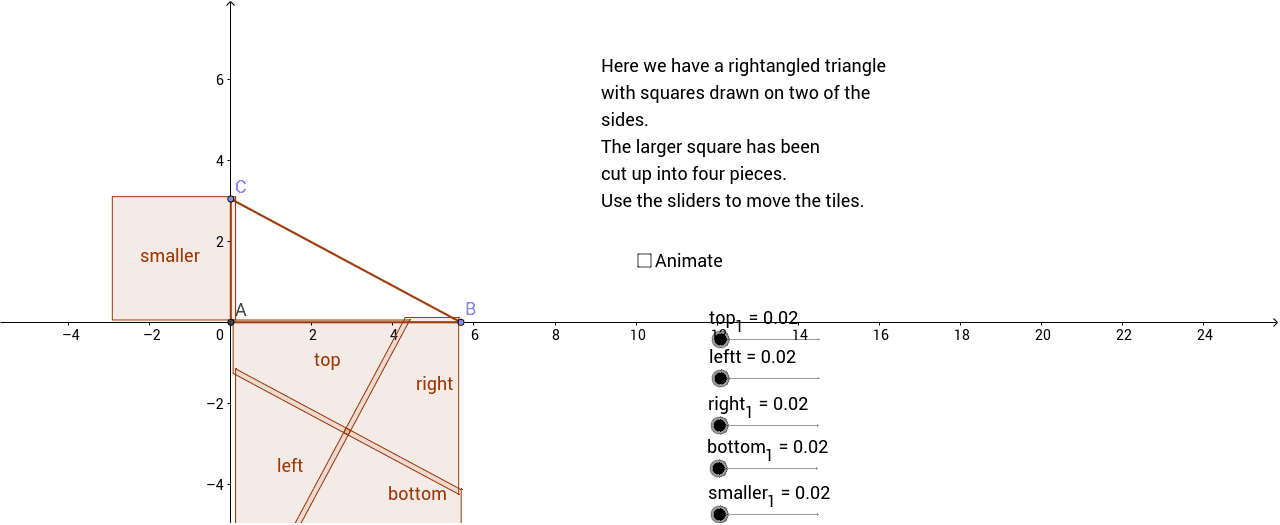
This example provides a graphic animation to illustrate the Pythagorean theorem, showing that the sum of the areas of the two squares constructed on the legs of a right triangle equals the area of the square constructed on the hypotenuse. Core concepts include the Pythagorean theorem, properties of right triangles, area calculation, and geometric construction. The GeoGebra construction uses commands such as Intersect, Point, Polygon, Midpoint, Line, OrthogonalLine, Vector, and Translate to build the triangle and three squares, with a slider animation to dynamically demonstrate the relationship. It is suitable for high‑school geometry or middle‑school mathematics classes, and can be used for classroom presentation, problem solving, and student exploration activities.
GeoGebra Commands & Parameters
Intersect(xAxis, yAxis) → APoint(xAxis) → BPoint(yAxis) → CPolygon(A, C, B) → poly1, b, a, cPolygon(A, C, 4) → poly2, a_1, c_1, d, e, D, EPolygon(C, B, 4) → poly3, c_2, b_1, f, g, F, GPolygon(B, A, 4) → poly4, b_2, a_2, h, i, H, IMidpoint(A, I) → JLine(J, a) → jOrthogonalLine(J, a) → kIntersect(j, a_2) → KIntersect(j, i) → LIntersect(k, c) → MIntersect(k, h) → NPolygon(A, K, J, M) → poly5, a_3, k_1, j_1, mPolygon(K, H, N, J) → poly6, k_2, h_1, n_2, j_2Polygon(I, N, J, L) → poly7, i_1, n_1, j_3, lPolygon(L, B, M, J) → poly8, l_1, b_3, m_1, j_4Vector(J, G) → uVector(J, C) → vVector(J, B) → wVector(J, F) → zTranslate(I, u) → I'Translate(N, u) → N'Translate(J, u) → J'Translate(L, u) → L'Translate(L, v) → L'_1Translate(B, v) → B'Translate(M, v) → M'Translate(J, v) → J'_1Translate(K, z) → K'Translate(H, z) → H'Translate(N, z) → N'_1Translate(J, z) → J'_2Translate(A, p) → A'Translate(K, p) → K'_1Translate(J, p) → J'_3Translate(M, p) → M'_1Polygon(A', K'_1, J'_3, M'_1) → poly5', a', k'_1, j'_3, m'_1Translate(A', w) → A''Translate(K'_1, w) → OTranslate(J'_3, w) → PTranslate(M'_1, w) → QTranslate(K, rightpiece) → K'_2Translate(H, rightpiece) → H'_1Translate(N, rightpiece) → N'_2Translate(J, rightpiece) → J'_4Polygon(K'_2, H'_1, N'_2, J'_4) → left, k'_2, h'_1, n'_2, j'_4Translate(I, toppiece) → I'_1Translate(N, toppiece) → N'_3Translate(J, toppiece) → J'_5Translate(L, toppiece) → L'_2Polygon(I'_1, N'_3, J'_5, L'_2) → bottom, i'_1, n'_3, j'_5, l'_2Translate(L, leftpiece) → L'_3Translate(B, leftpiece) → B'_1Translate(M, leftpiece) → M'_2Translate(J, leftpiece) → J'_6Polygon(L'_3, B'_1, M'_2, J'_6) → right, l'_3, b'_1, m'_2, j'_6Translate(A', bottompiece) → A''_1Translate(K'_1, bottompiece) → RTranslate(J'_3, bottompiece) → STranslate(M'_1, bottompiece) → TPolygon(A''_1, R, S, T) → top, a''_1, r, s, tIntersect(f, b_1) → UMidpoint(C, U) → VIntersect(d, e) → WMidpoint(C, W) → ZVector(Z, V) → qTranslate(poly2, otherpiece) → smaller
AI Drawing Prompt Reference
Draw a right triangle ABC with the right angle at A. Construct three squares with the sides of the triangle. Use a slider to animate the sum of the areas of the two smaller squares equaling the area of the larger square.
The prompt above was compiled from the original drawing commands and is for reference only.