
Angles of an Isosceles Trapezoid (Bilingual)
Loading the math board and drawing, please wait…
In collections
Quadrilaterals الرُباعيات
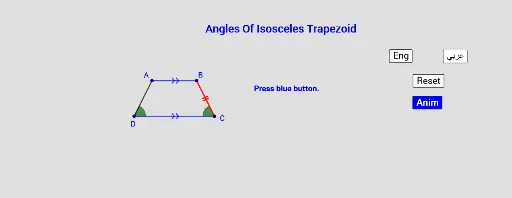
① This interactive GeoGebra example visually demonstrates the angle relationships in an isosceles trapezoid, with labels in English and Arabic. ② The core mathematical concept is the property of isosceles trapezoids: base angles on the same base are equal, and consecutive angles are supplementary (sum to 180°). ③ Construction details: the trapezoid is built using Segment, Translate, Vector, and Rotate commands; four angles (α, β, γ, δ) are marked with the Angle tool; buttons (button1–button4) toggle language displays, and text objects (text1–text6) provide labels. ④ Suitable for middle school geometry lessons or self-study, especially in bilingual classrooms, to explore and verify the angle properties of isosceles trapezoids interactively.
GeoGebra Commands & Parameters
Segment(A, B) → fSegment(B, C) → gSegment(D, A) → iSegment(D, C) → hAngle(D, A, B) → αAngle(A, B, C) → βAngle(B, C, D) → γAngle(C, D, A) → δTranslate(C, Vector[(a * Vector[C, D])]) → C1Translate(B, Vector[(a * Vector[C, D])]) → B1Vector(C, D) → uVector(B, A) → vSegment(B1, C1) → jRotate(B1, (-((b * (180° - (2 * γ))))), C1) → B2Segment(C1, B2) → k
AI Drawing Prompt Reference
Draw an isosceles trapezoid, highlighting that its base angles are equal and consecutive angles sum to 180°. Label the four angles α, β, γ, δ with different colors and add text explaining their relationships. Include a movable vector to construct the other side of the trapezoid via translation and rotation, with a slider to control the transformation.
The prompt above was compiled from the original drawing commands and is for reference only.