
Angle Relationships within Parallel Lines
Loading the math board and drawing, please wait…
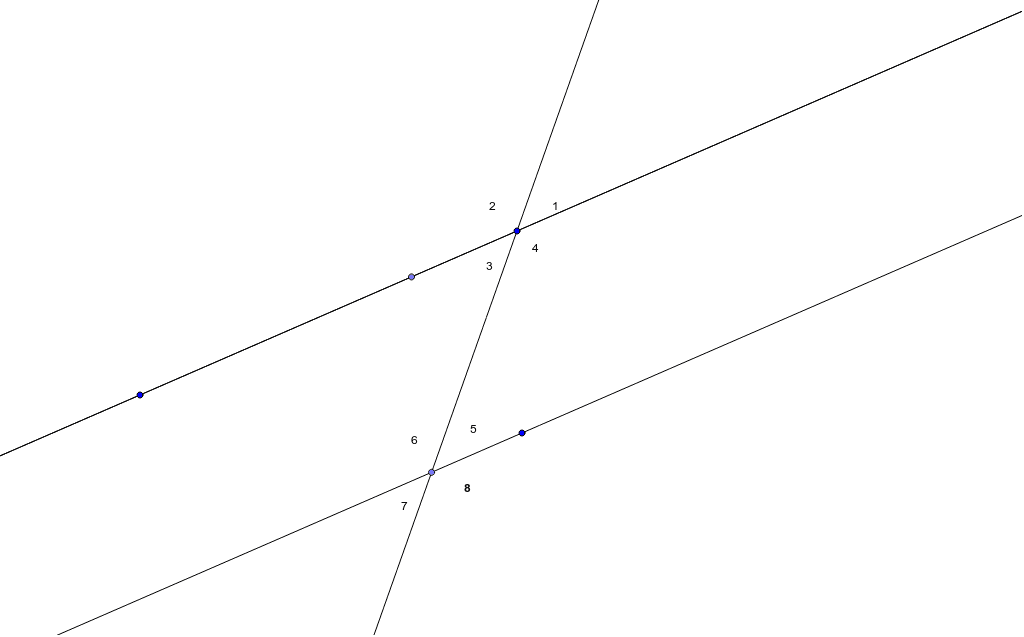
This GeoGebra example demonstrates the angle relationships formed when two parallel lines are intersected by a transversal. Using the Line command to construct parallel lines a and b intersected by line c, and Point command to mark intersection points A, B, C, D, with text labels showing corresponding angles, alternate interior angles, consecutive interior angles, and vertical angles. Users can drag points or adjust line positions to observe how angle measures change while maintaining their relationships. Ideal for middle school students in grades 7-9 learning parallel line properties, and for teachers as a visual aid in geometry instruction.
GeoGebra Commands & Parameters
Line(A, B) → aLine(C, a) → bPoint(b) → DLine(B, D) → cPoint(a) → ELine(B, E) → d
AI Drawing Prompt Reference
Draw two parallel lines intersected by a transversal line, creating two sets of intersection points. Label the angle relationships at each intersection, including corresponding angles, alternate interior angles, consecutive interior angles, and vertical angles. Use different colors to distinguish the parallel lines from the transversal and clearly show the positions of each angle type.
The prompt above was compiled from the original drawing commands and is for reference only.