
Angle between Two Planes (Pyramid Model)
Loading the math board and drawing, please wait…
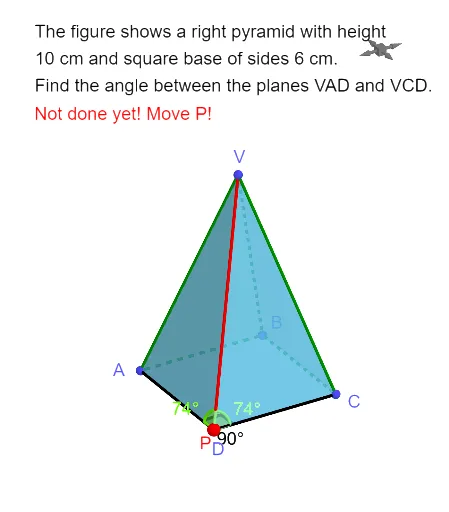
This GeoGebra example demonstrates how to find the angle between two planes using a four-sided pyramid model. The core mathematical concept is the dihedral angle in solid geometry: the angle between two planes is measured by the angle between two lines perpendicular to their intersection line, drawn from a common point on that line. The construction uses the Pyramid command to create the pyramid, OrthogonalLine and Intersect to locate perpendiculars and intersection points, and Line, Segment, and Angle to construct and measure the plane angle. This resource is ideal for high school solid geometry lessons, helping students visualize and compute dihedral angles, and also useful for introductory college geometry review.
GeoGebra Commands & Parameters
Pyramid(A, B, C, D, V) → a, faceABCD, edgeAV, edgeBV, edgeCV, edgeDV, faceABV, faceBCV, faceCDV, faceADV, edgeAB, edgeBC, edgeCD, edgeADOrthogonalLine(A, edgeDV, space) → fIntersect(f, edgeDV) → EOrthogonalLine(C, edgeDV, space) → gIntersect(edgeDV, g) → FLine(E, g) → hSegment(A, P) → iSegment(P, C) → jAngle(A, P, V) → αAngle(C, P, V) → βAngle(A, P, C) → γ
AI Drawing Prompt Reference
Draw a four-sided pyramid with a quadrilateral base and an apex above the base. From one base vertex, draw a perpendicular line to the opposite lateral edge, marking the foot on that edge. From another base vertex, draw another perpendicular to the same lateral edge, marking its foot. Connect the two feet with a line, and choose a point on this line. From this point, draw segments to the two base vertices and to the apex. Finally, mark three angles: two between the segments and the lateral edge, and one between the two perpendicular lines, representing the dihedral angle between the two planes.
The prompt above was compiled from the original drawing commands and is for reference only.